FeaturesScreenshotsFAQBlogReleasesPrivacyContact
HelioPeak

HelioPeak

for PVOutput

Track your solar panel production with beautiful charts and detailed statistics. Reads directly from PVOutput.org, no intermediary server, no data manipulation.

Download on the App Store

See it in action

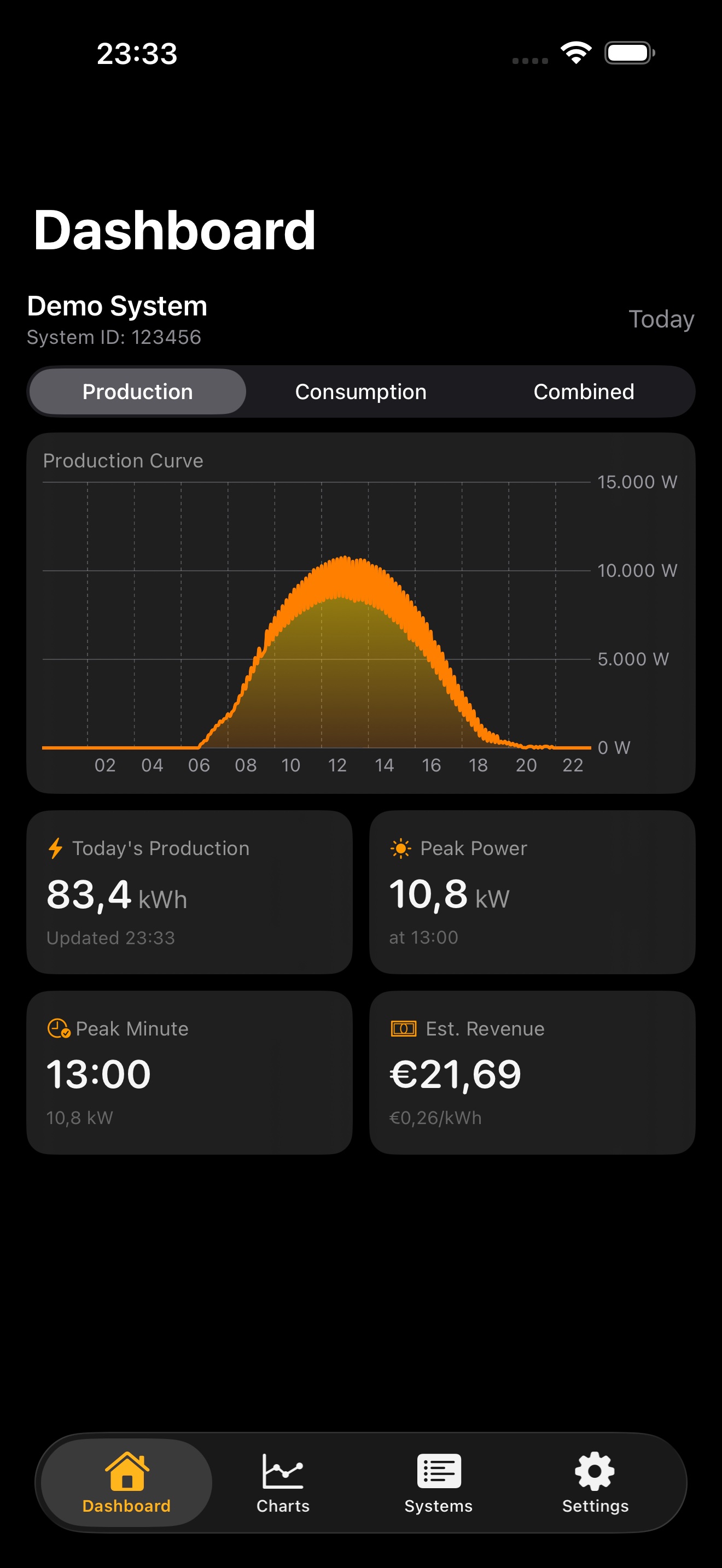
HelioPeak Dashboard Production View
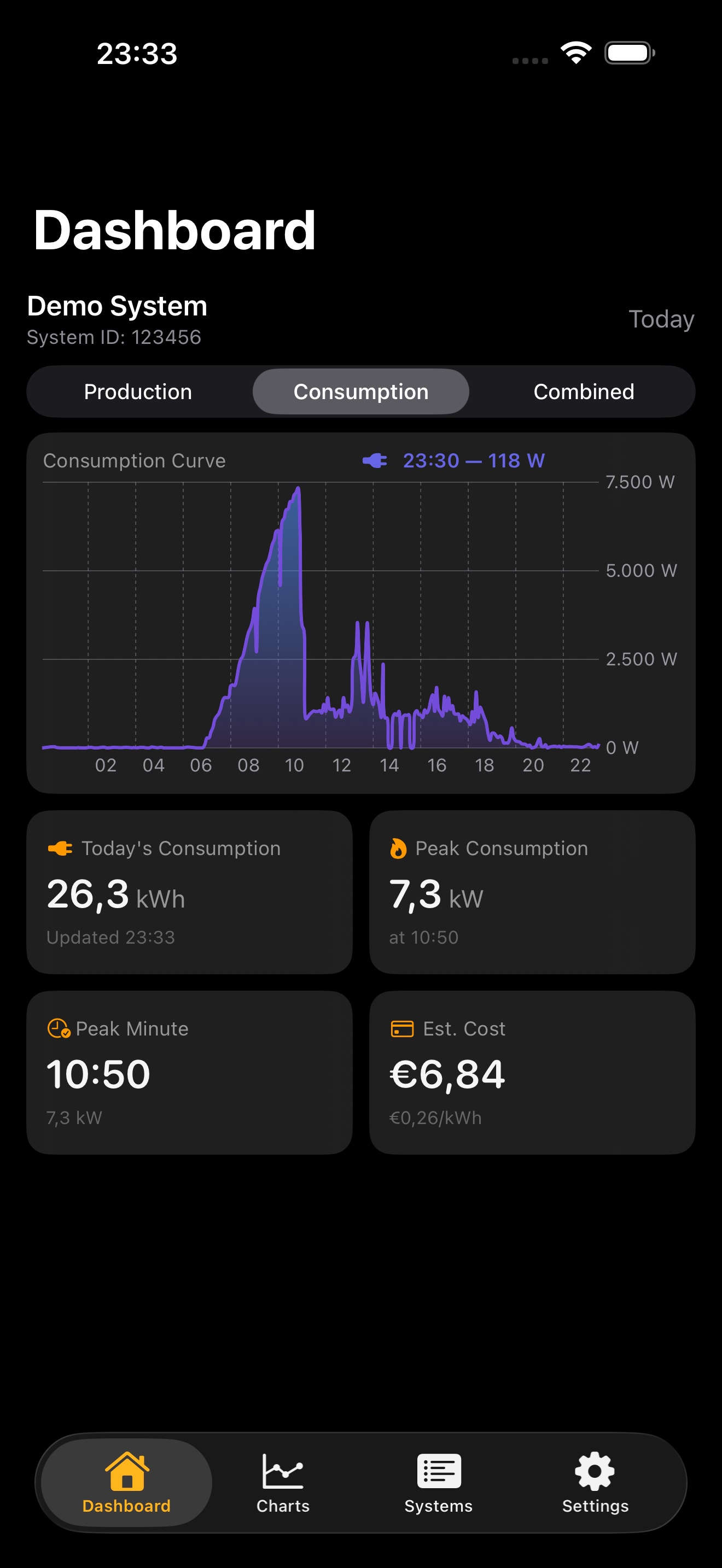
HelioPeak Live Consumption View
HelioPeak Dashboard with production and consumption combined
HelioPeak Weekly Combined Chart
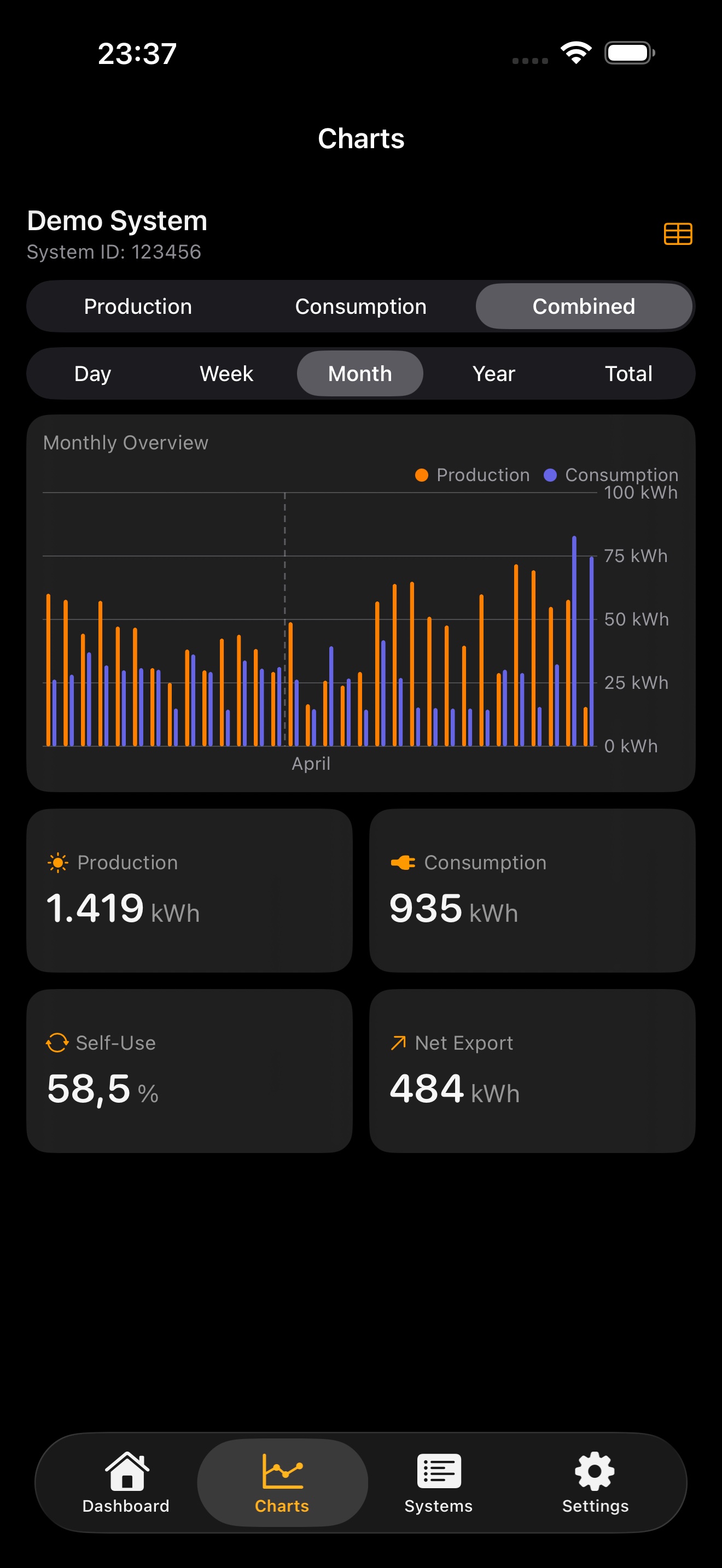
HelioPeak Monthly Combined Chart
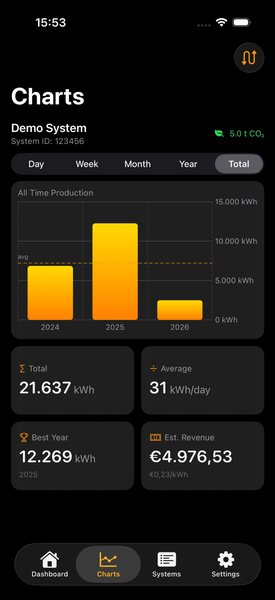
HelioPeak All Time Production
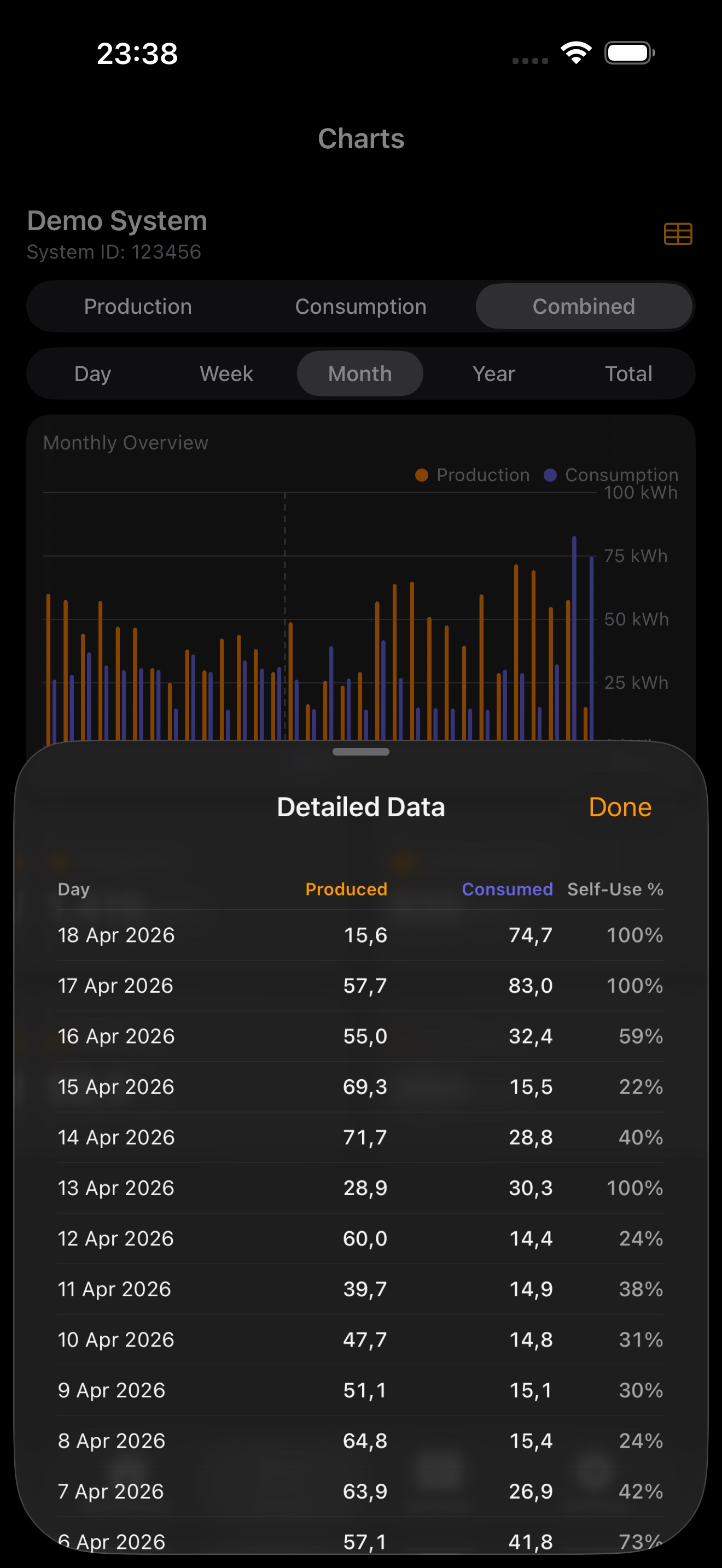
HelioPeak Detailed Data Table
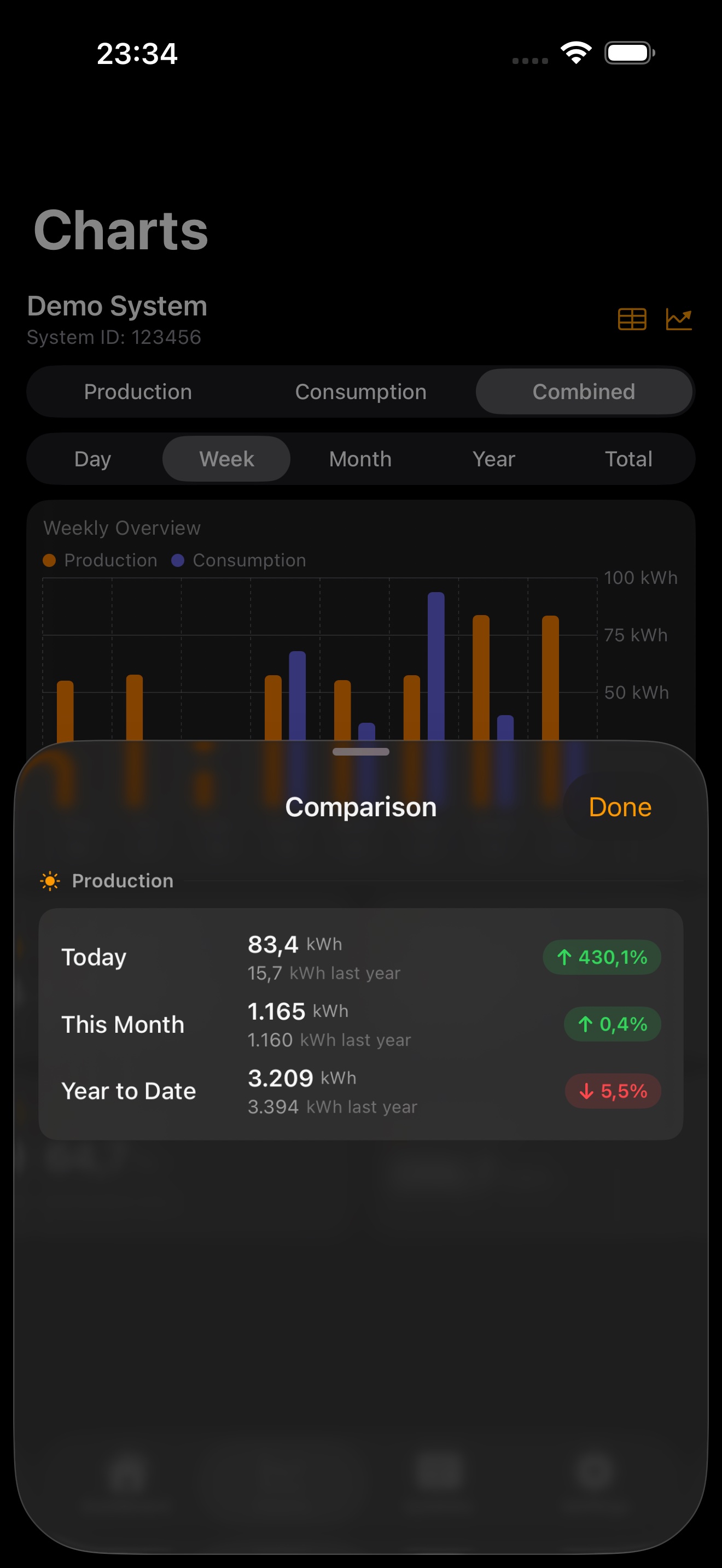
HelioPeak Year-over-Year Comparison
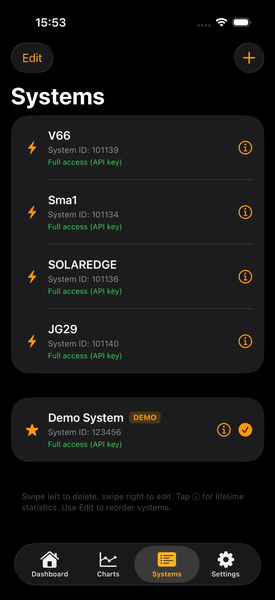
HelioPeak Multiple Systems
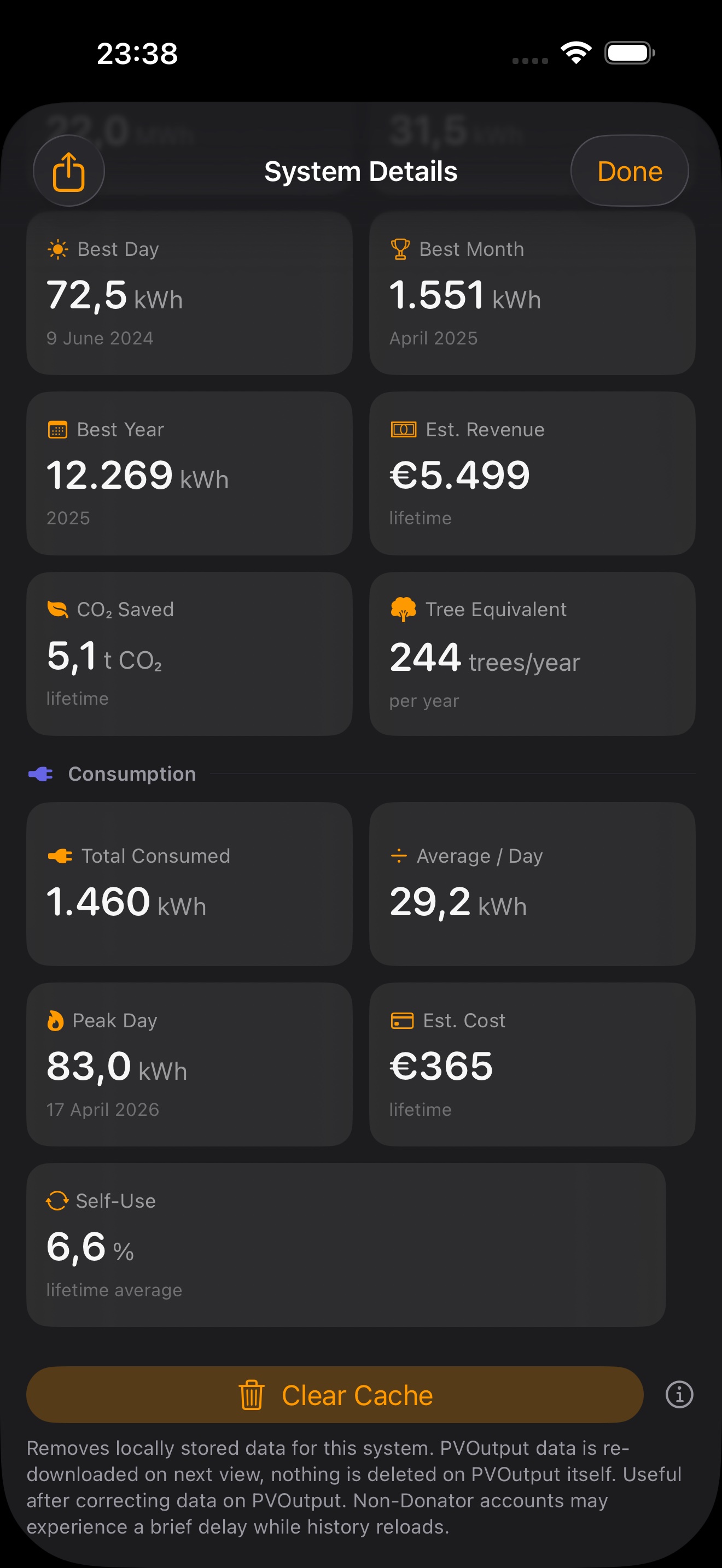
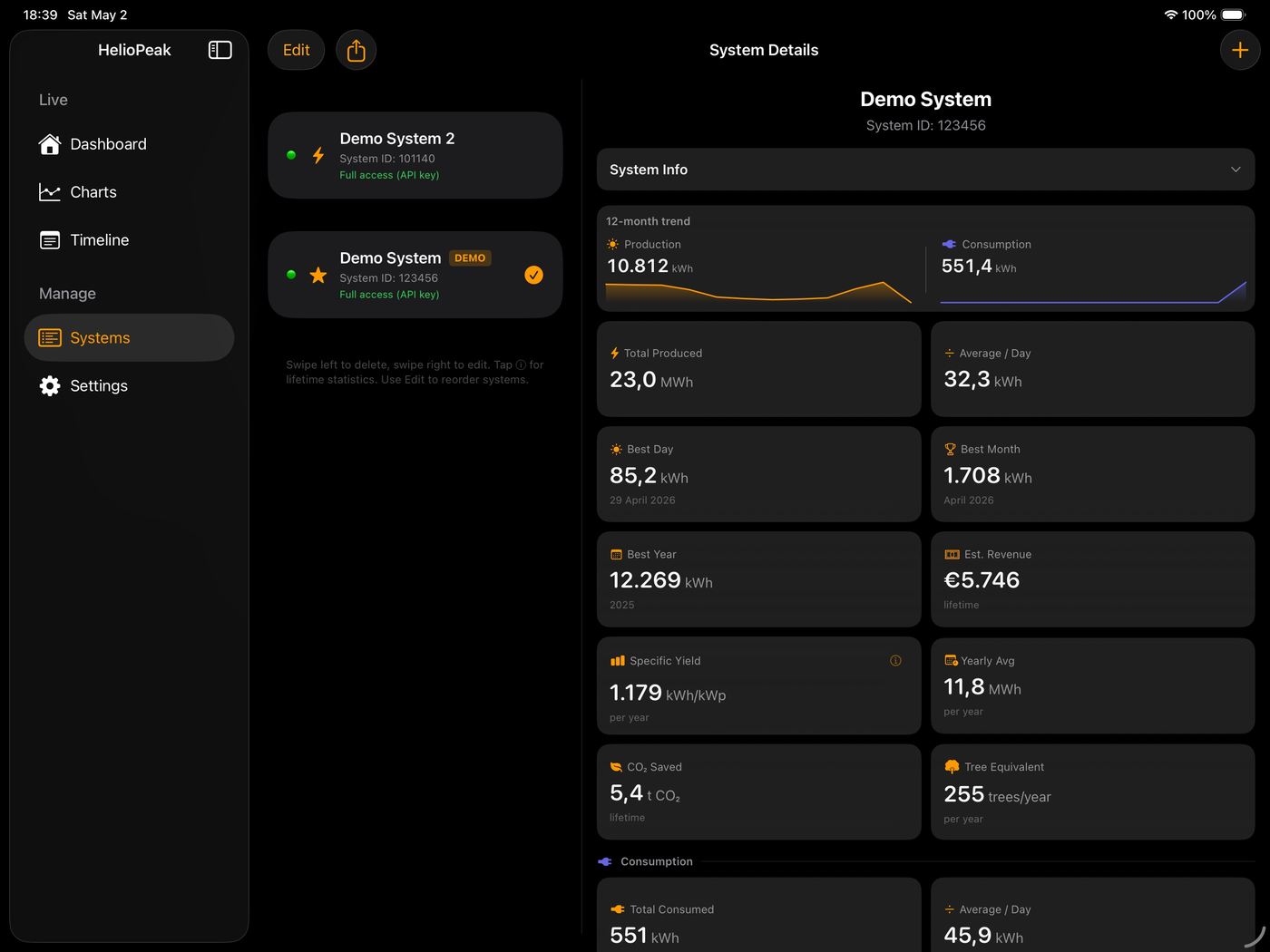
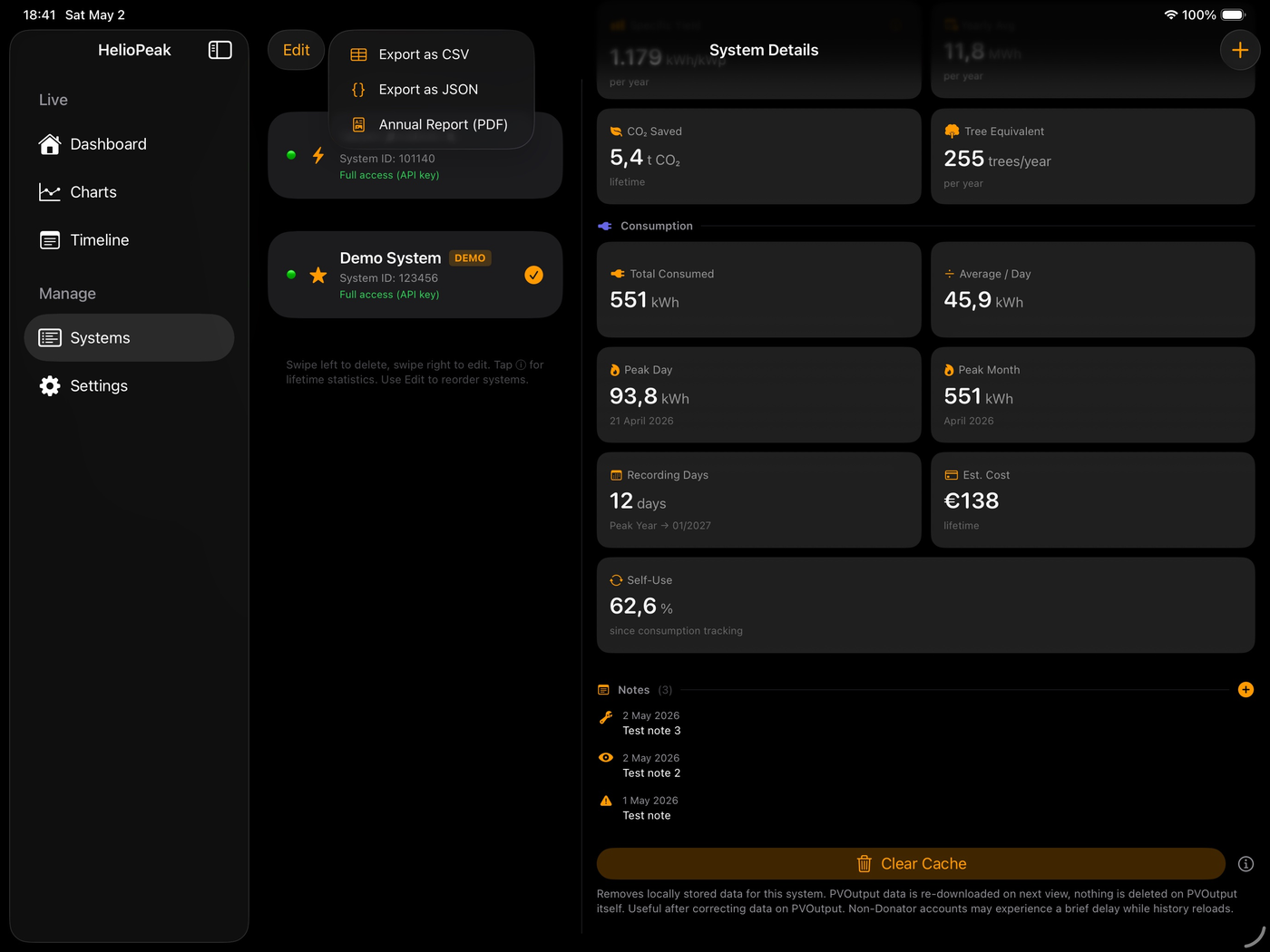
HelioPeak System Details with Clear Cache
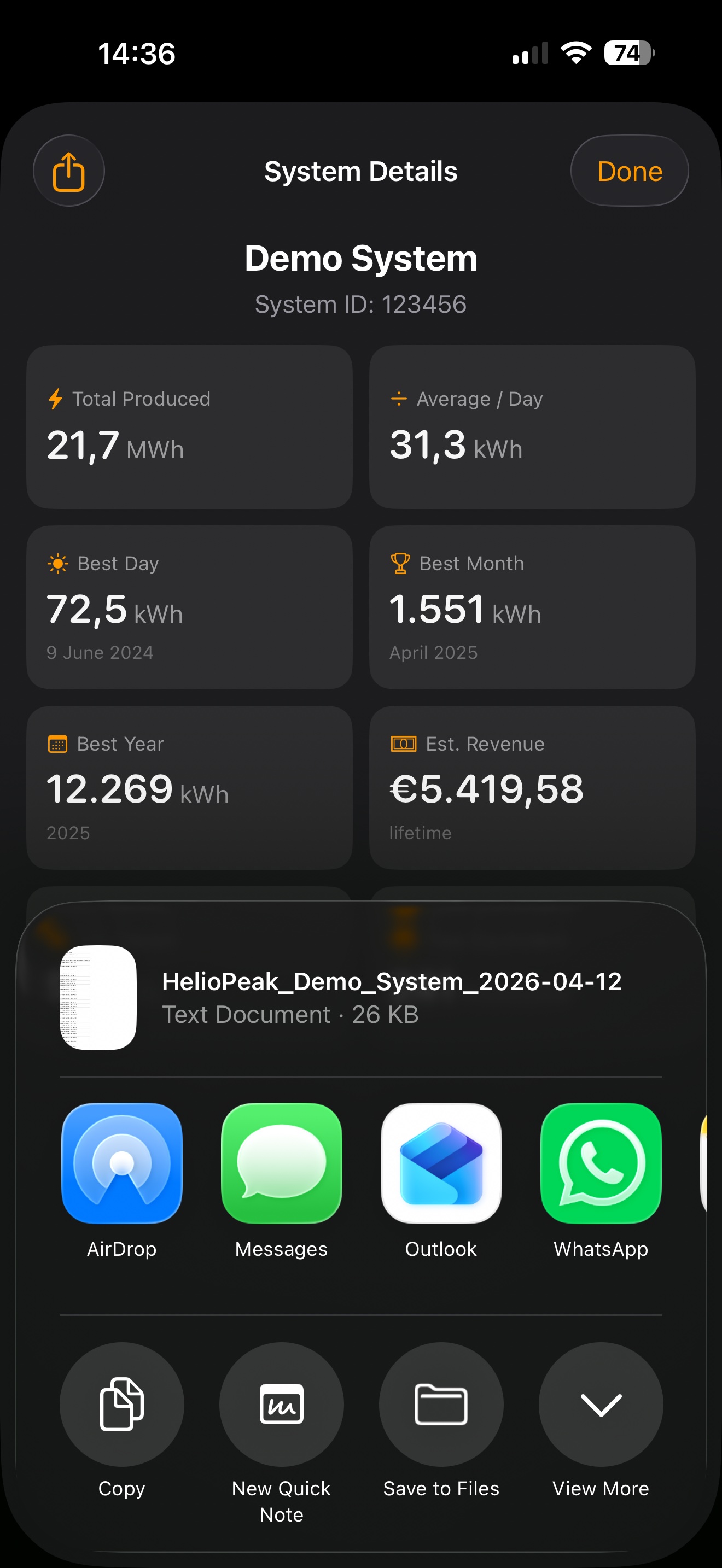
HelioPeak CSV Export
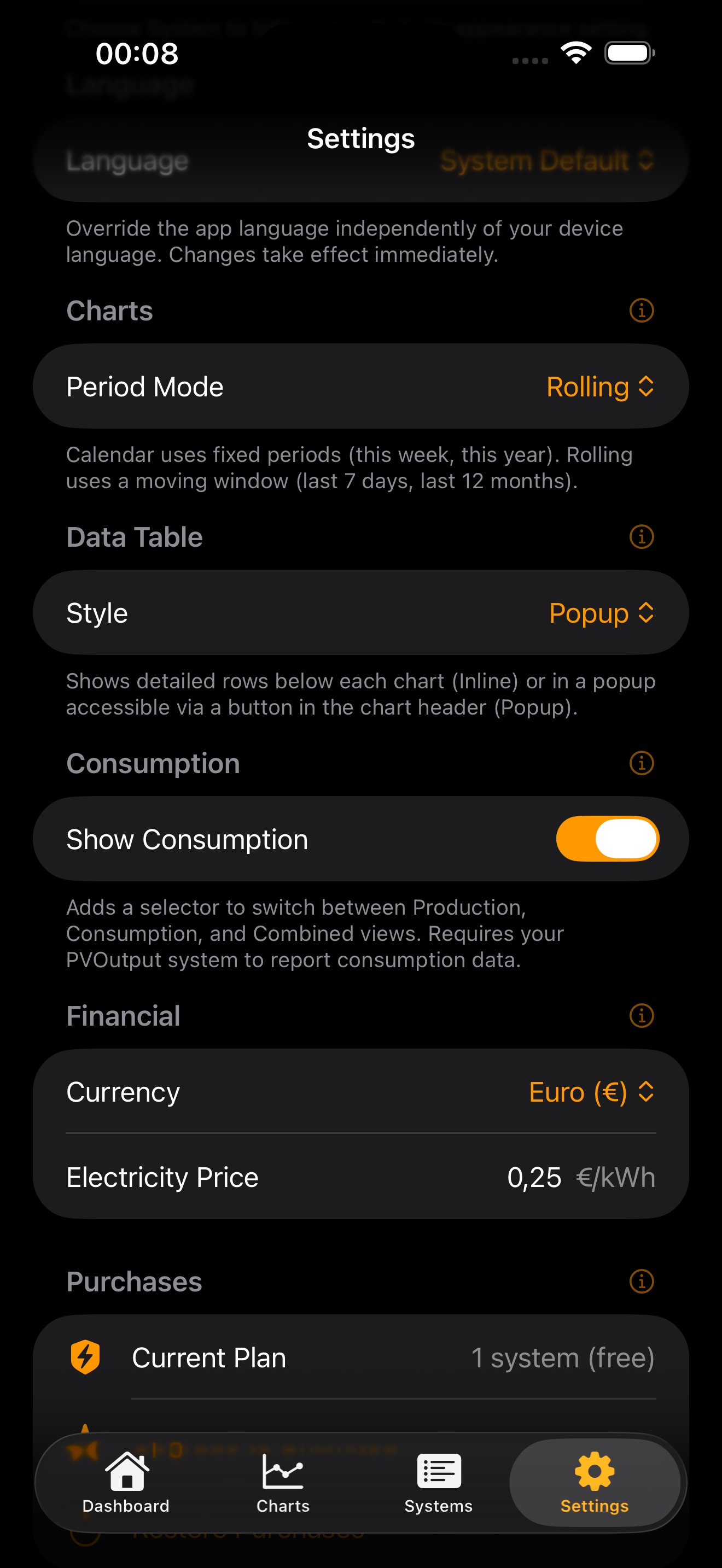
HelioPeak Customization Settings
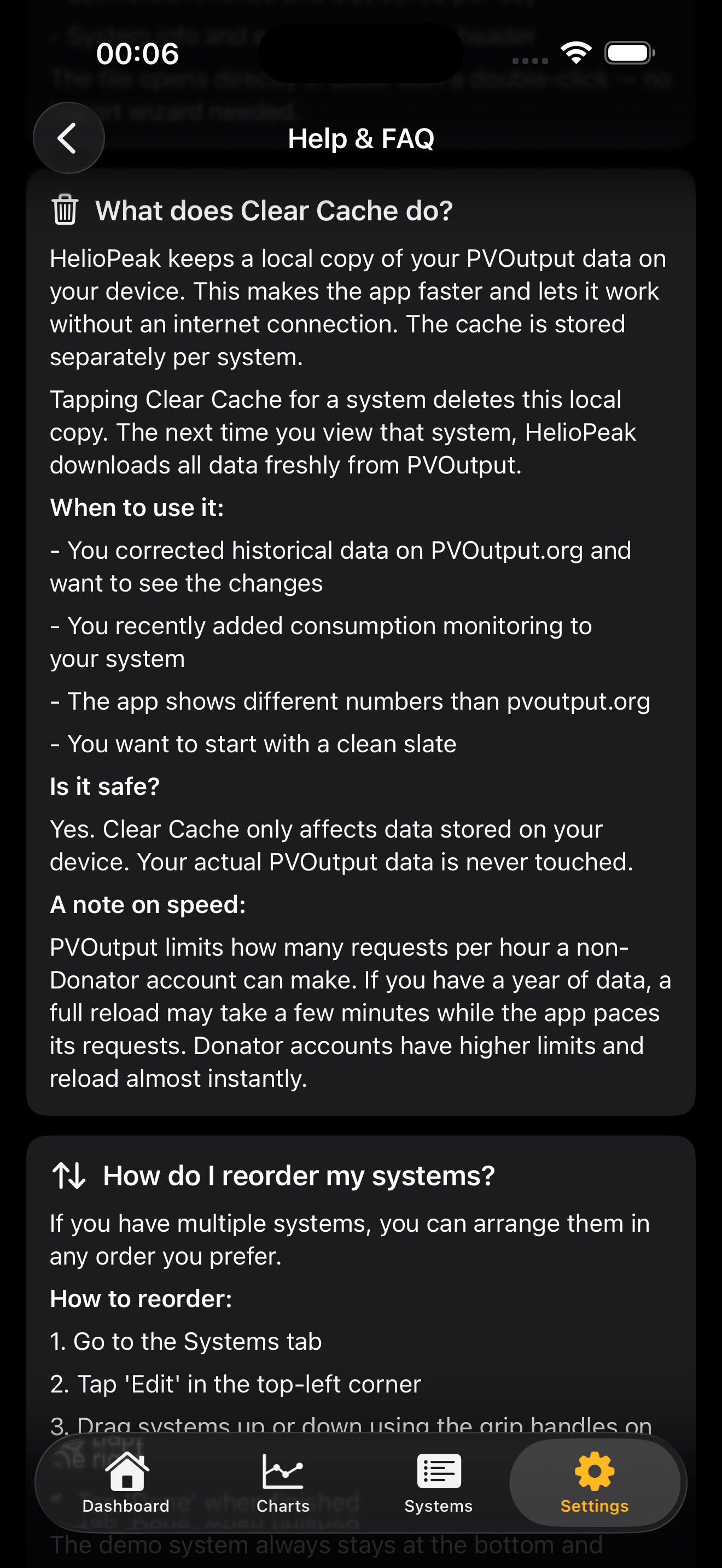
HelioPeak Help and FAQ
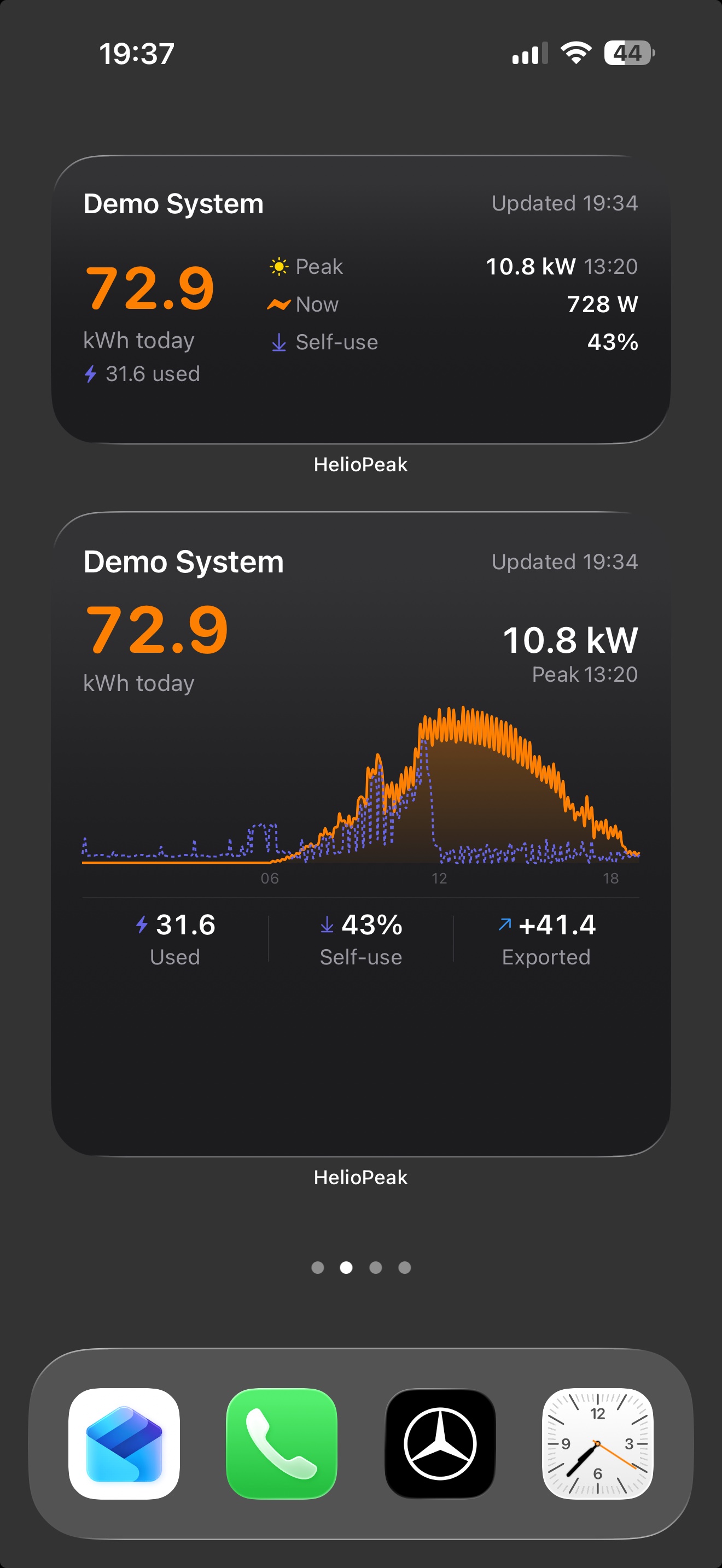
HelioPeak Home Screen Widget

Also on iPad and Mac

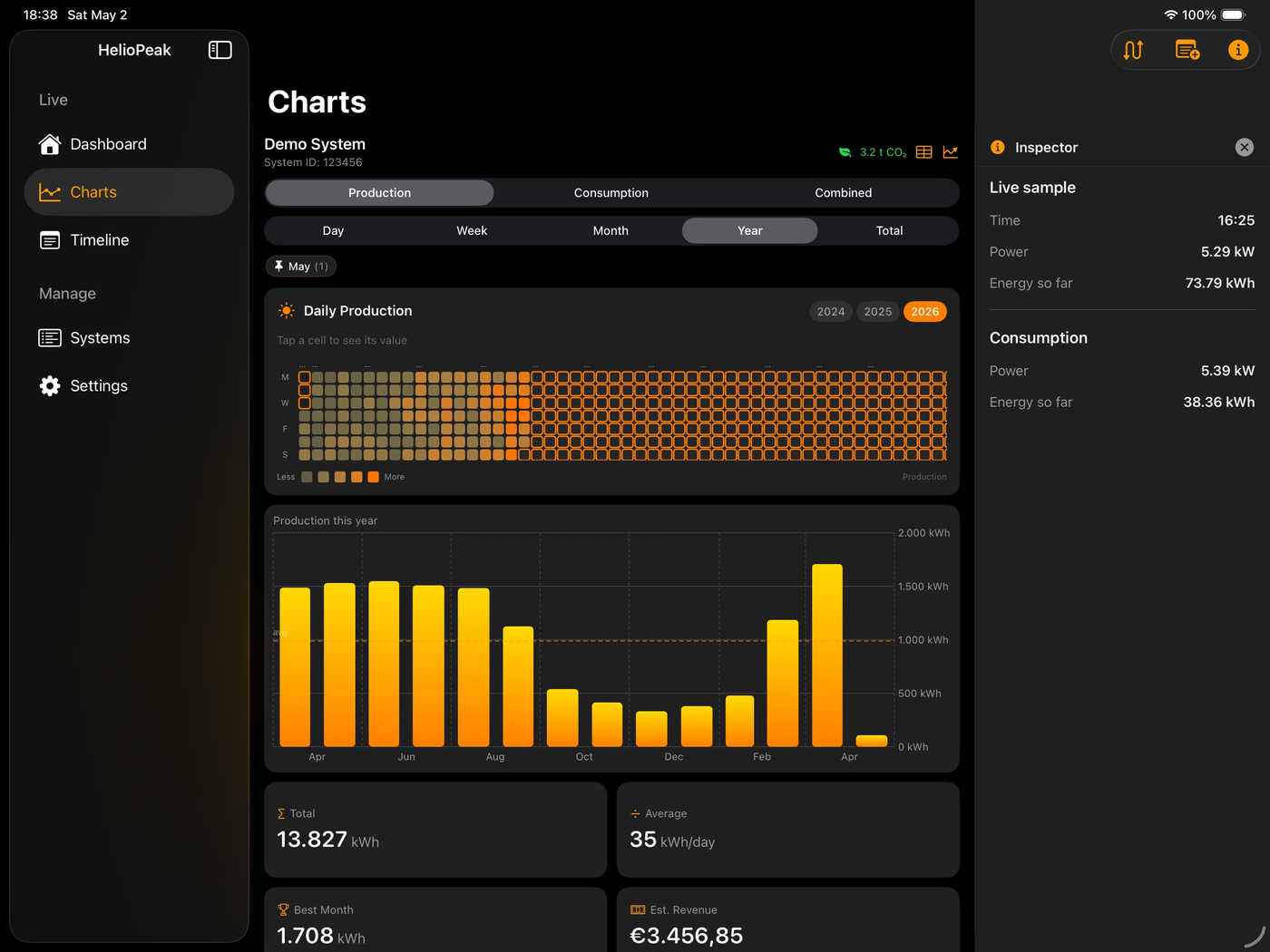
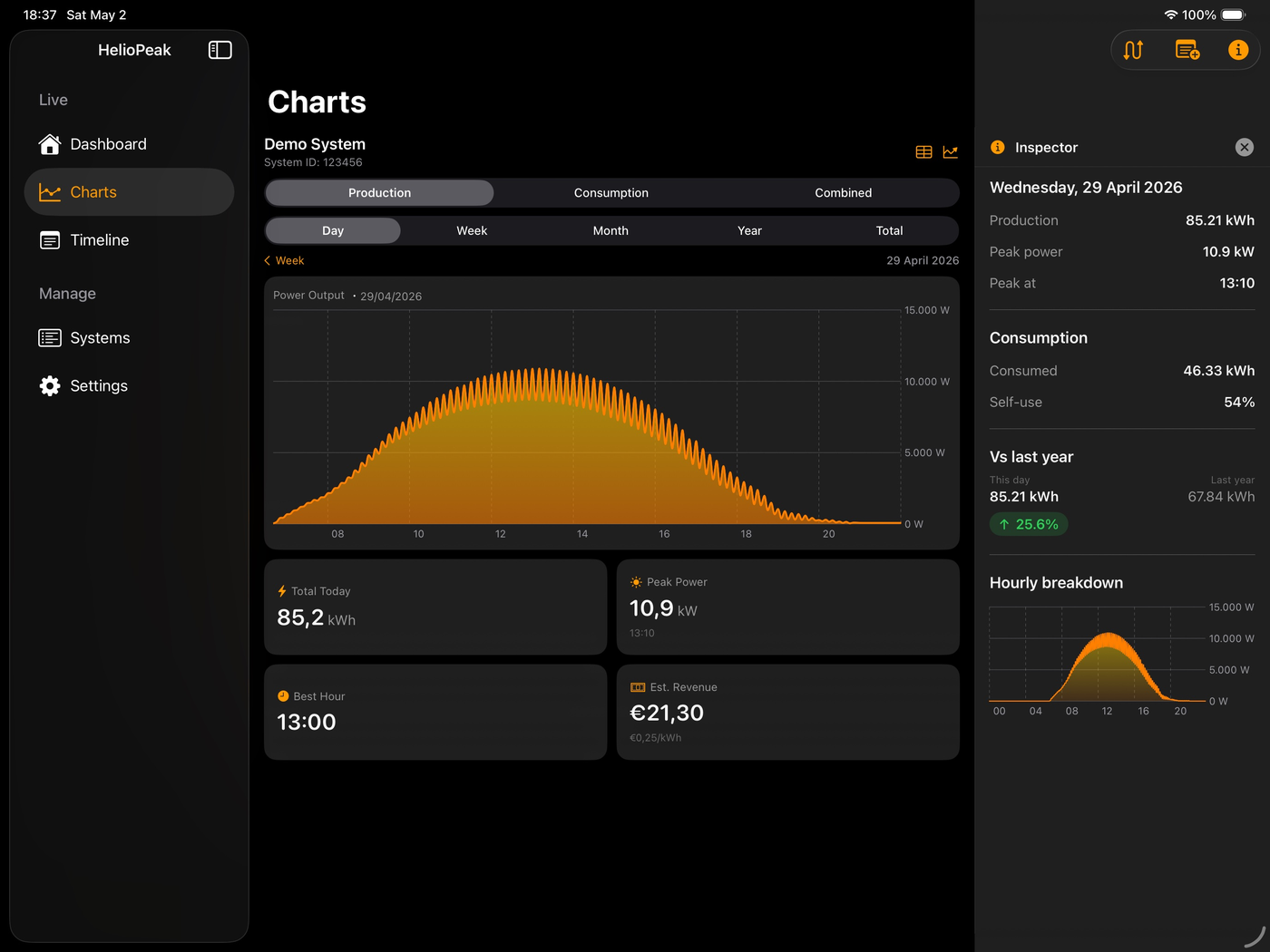
Designed for iPad with sidebar navigation, an Inspector panel, and a full-year heatmap. Runs natively on Apple Silicon Macs — one App Store purchase, three platforms.
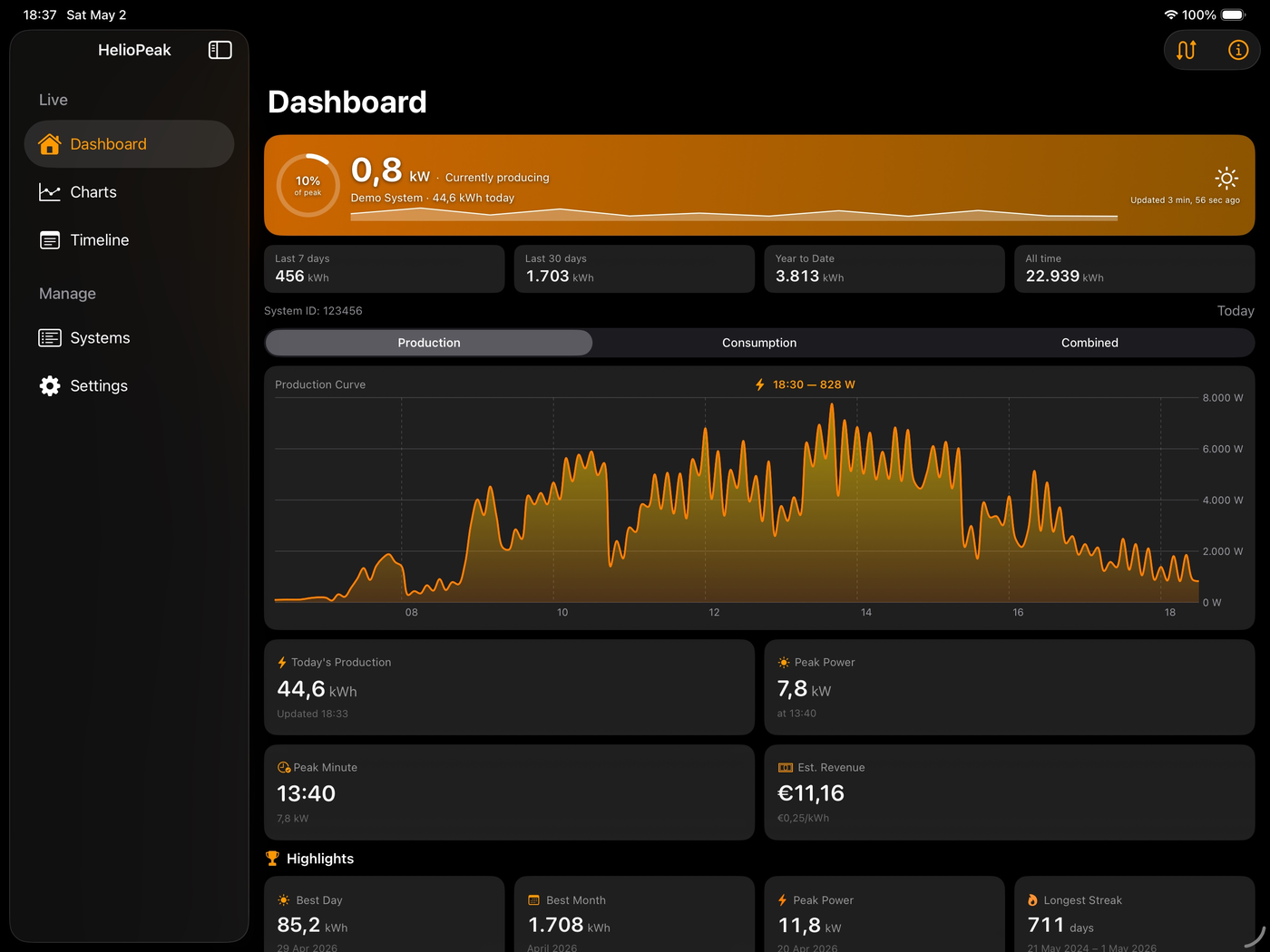
iPadHelioPeak Dashboard on iPad in dark mode showing live production curve and highlights
iPadHelioPeak Charts on iPad with Inspector panel showing year-over-year comparison
iPadHelioPeak Year view on iPad showing the full-year production heatmap
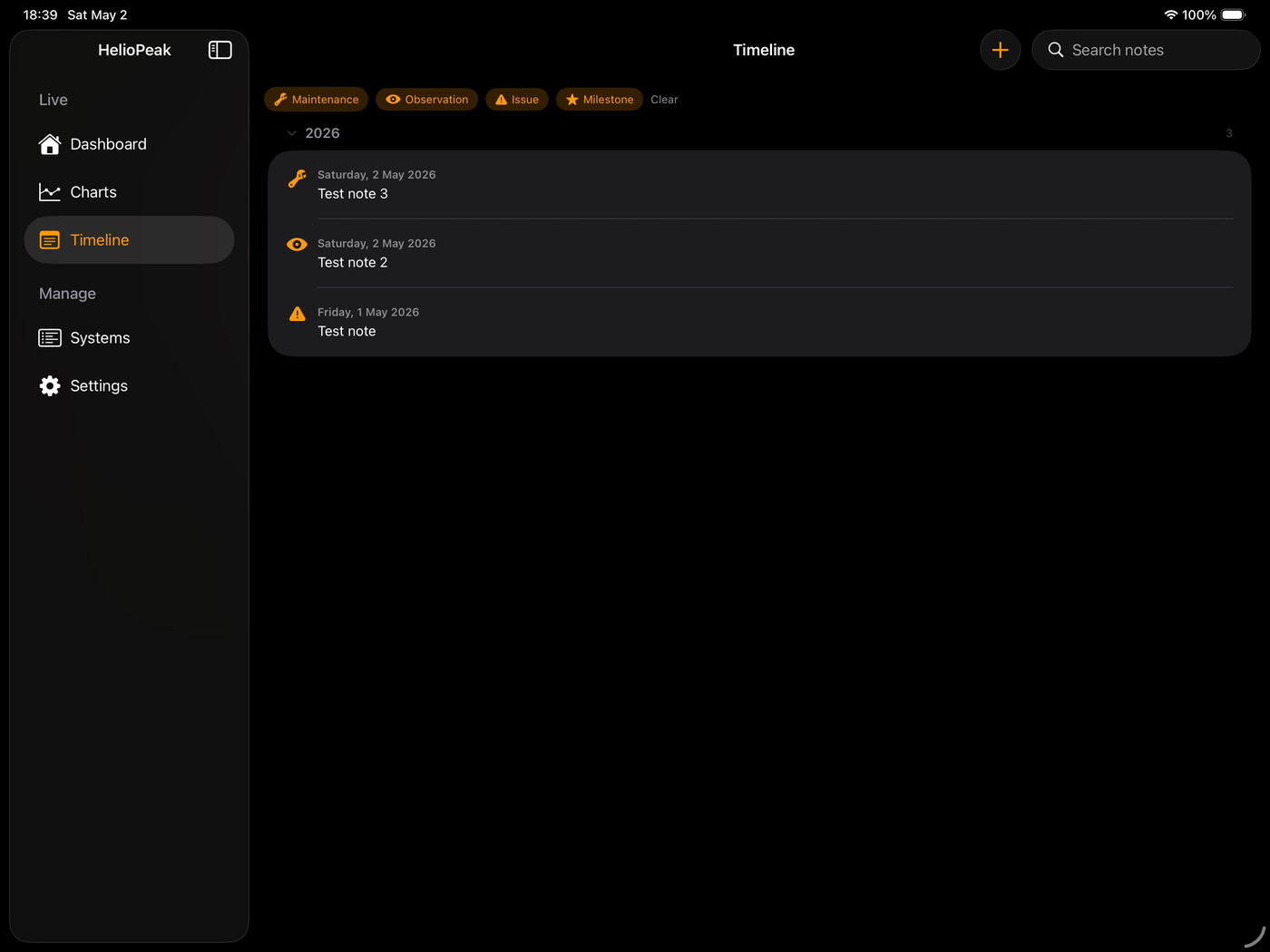
iPadHelioPeak Timeline of notes on iPad with category filters
iPadHelioPeak Systems on iPad showing multiple installations with health status
iPadHelioPeak export menu on iPad with CSV, JSON, and Annual Report PDF options
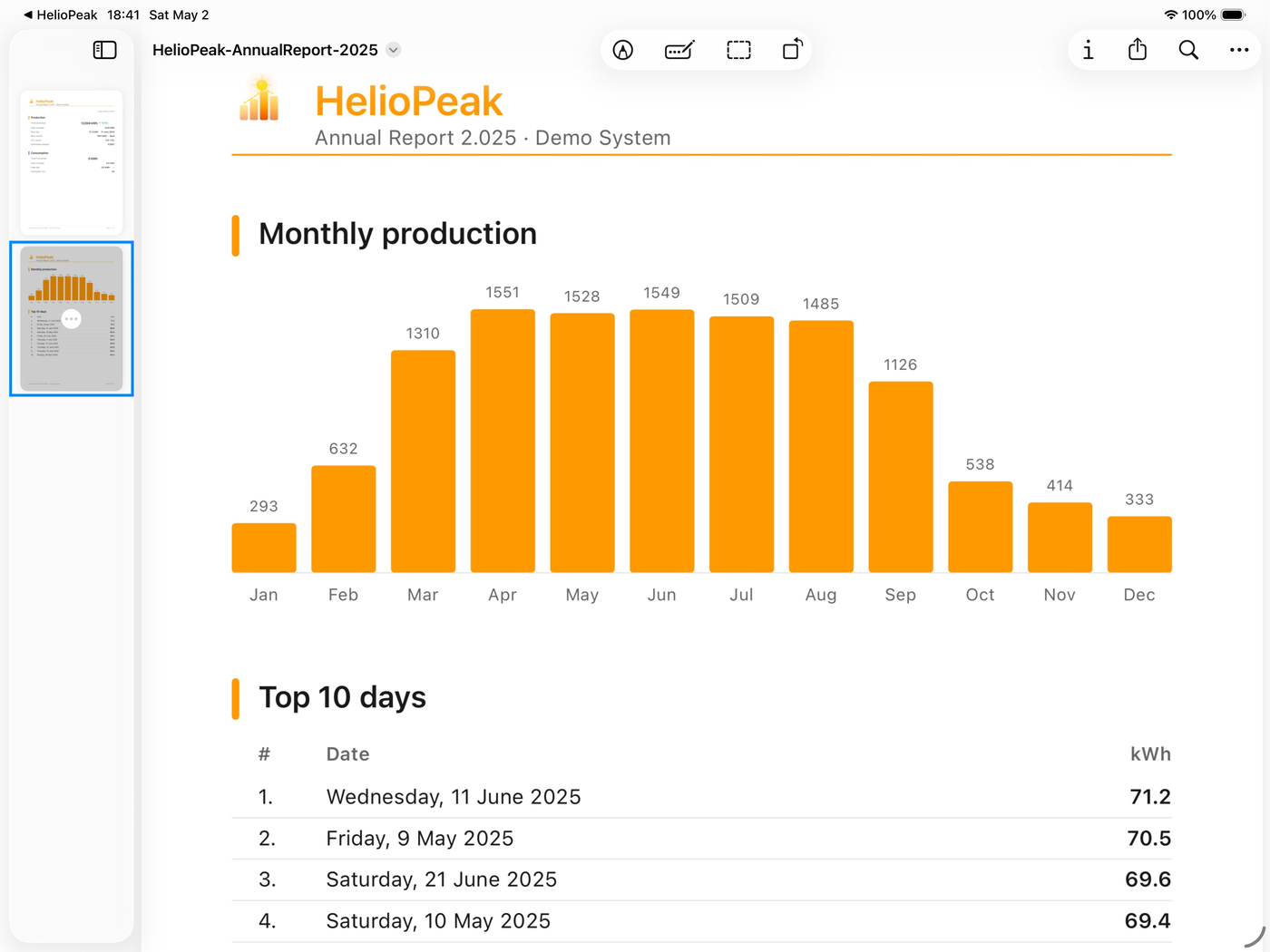
iPadHelioPeak Annual Report PDF on iPad showing monthly production chart
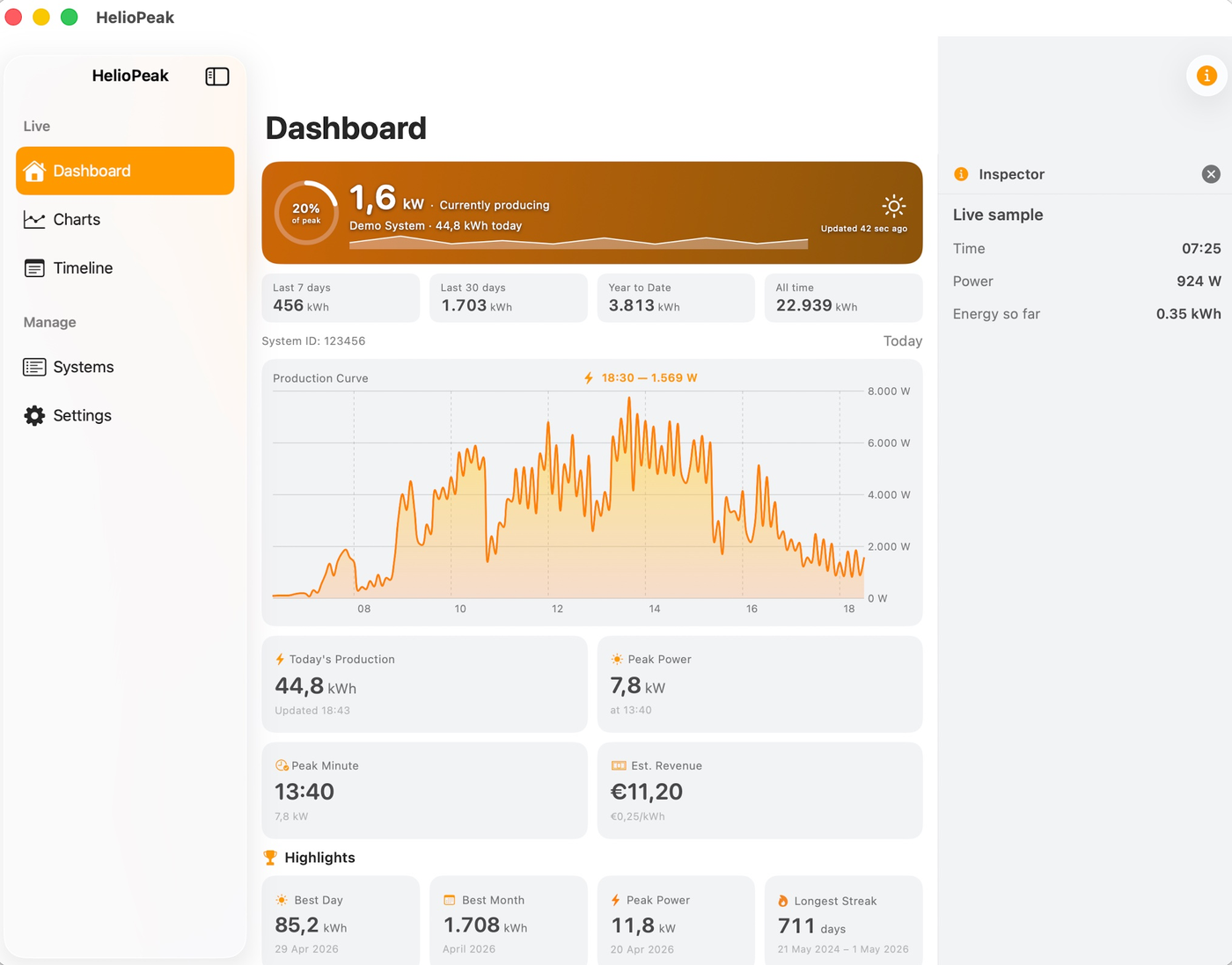
MacHelioPeak Dashboard on Mac in light mode with the Inspector panel
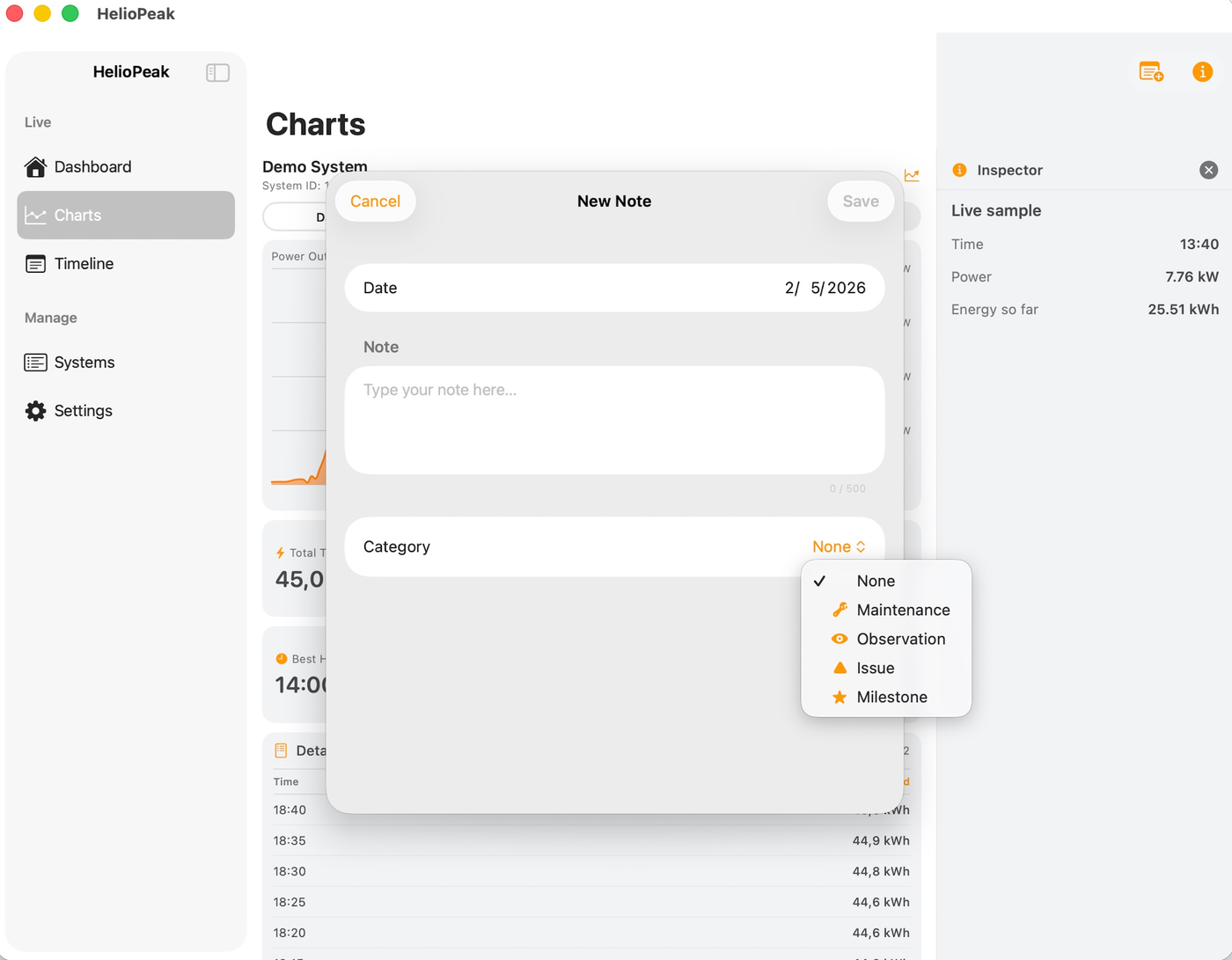
MacHelioPeak New Note dialog on Mac with the category selector open
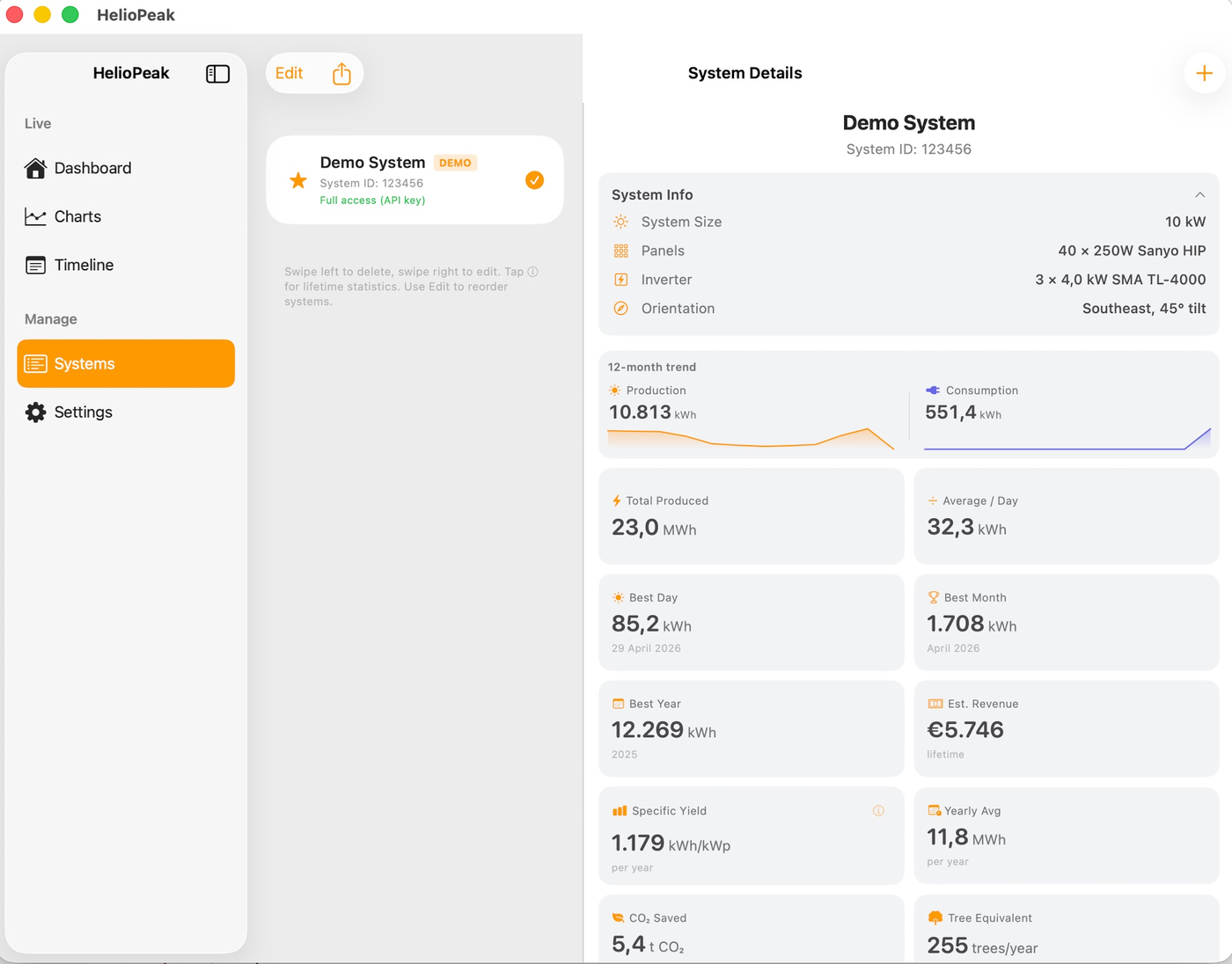
MacHelioPeak System Details on Mac showing lifetime metrics and consumption summary

Everything you need

A complete solar monitoring companion for PVOutput users.

Live Dashboard

Real-time production curve, peak power, and estimated revenue, updated with every refresh.

📈

5 Chart Periods

Day, week, month, year, and all-time charts for production and consumption. Tap any bar for details. Switch between calendar and rolling views.

📱

Home Screen Widget

Three sizes. Today's production and consumption at a glance, with intraday chart on the largest size. Matches your app's appearance setting.

☀️

Multiple Systems

Monitor all your solar installations in one app. Quick switch from any screen. Lifetime statistics per system.

📁

CSV, JSON & PDF Export

Export your complete history as CSV for Excel, JSON for scripts, or the multi-page Annual Report PDF. Notes included in CSV and JSON.

🍃

CO₂ Savings

See how much carbon dioxide your panels have offset, and the equivalent number of trees planted per year.

📔

Notes & Timeline

Attach private notes to specific days — maintenance, observations, milestones. Synced across your Apple devices via iCloud, never visible to us.

📄

Annual Report PDF

Multi-page A4 report for any year. Cover, monthly breakdown, top 10 days, year-over-year delta. Available in all six languages.

🖥️

Native iPad & Mac

Sidebar navigation, Live Status hero, Inspector panel, year heatmap, keyboard shortcuts. Runs natively on Apple Silicon Macs.

📲

iPhone Landscape

Rotate for chart-priority mode. Stat cards step aside, the production curve fills the full screen.

🟢

System Health Indicators

Color-coded dots show system status at a glance. Green if productive within 24h, red for likely inverter issues. Local check, no extra API calls.

📊

Year-over-Year Comparison

Side-by-side breakdown of Today / This Month / Year-to-Date versus the same periods last year. Export as a one-page PDF.

Up and running in 3 steps

No account with us needed. Your data stays between you and PVOutput.

1

Create an API key

Log in to pvoutput.org, go to Settings → API Access, and create a read-only API key. One key works for all your systems.

2

Add your system

Open HelioPeak, tap the + button, enter your System ID and API key. Your System ID is in your PVOutput account URL.

3

Track your production

That's it. Your complete production history loads automatically. Browse charts, check stats, export to CSV.

Built with SwiftUI & Swift Charts
iOS 18+
Dark & Light mode
No account required
Free with 1 system

What's next

HelioPeak is actively developed and shaped by user feedback.

Have a feature request? Let us know →

Frequently Asked Questions

You need a PVOutput.org account with at least one registered solar system. In the app, enter your System ID and a read-only API key. You can find your System ID in your PVOutput account URL, and create a read-only API key under Settings > API Access on pvoutput.org.
Yes. HelioPeak is free with one solar system. All features are included: charts, live dashboard, system details, CSV/JSON/PDF exports, notes with iCloud sync, and CO₂ tracking. If you have multiple systems, a one-time in-app purchase unlocks unlimited systems. No subscription.
Yes. During onboarding, tap "Try Demo" to explore the app with a sample solar system. You can see all charts, statistics, and features before connecting your own system.
HelioPeak connects directly to PVOutput.org with your System ID and a read-only API key. There is no intermediary server.

Where do I find my System ID?
Your System ID is a numeric identifier for your solar installation on PVOutput.org. Log in to pvoutput.org, go to your system page, and the ID is visible in the URL (e.g. pvoutput.org/list.jsp?sid=12345). You can also find it under Settings > Registered Systems.

How do I create an API key?
An API key is required to access your production data. Log in to pvoutput.org, go to Settings > API Settings, click "New Key" and select "Read Only". Copy the generated key into HelioPeak. The key is case-sensitive — make sure to copy it exactly.

Does one API key work for everything?
Yes. A single read-only API key works for all solar systems linked to your PVOutput account, and across all your devices.

Multiple inverters?
PVOutput supports parent/child systems. Each inverter uploads as a separate child system, and the parent system aggregates them automatically. In HelioPeak, add the parent system to see the combined view. Set up parent/child relationships on pvoutput.org under Settings > Registered Systems > Edit > Parent System.
The Systems tab lists every PVOutput system you have added. From here you switch between systems, edit, delete, reorder, and dive into per-system statistics.

System Details (the ⓘ button)
Each system in your list has an info button that opens a detailed statistics page with total lifetime production, average daily production, best day/month/year, estimated lifetime revenue, and CO₂ saved with a tree equivalent. All data is fetched directly from PVOutput.

How do I switch between systems?
Look for the swap icon in the top-right corner of the Dashboard and Charts screens. Tap it to see a dropdown of all your systems. The icon only appears when you have two or more systems added. On iPad you can also tap a chip in the "Other Systems" strip at the bottom of the Dashboard.

How do I reorder my systems?
Go to the Systems tab, tap "Edit", drag systems up or down using the grip handles, then tap "Done". The demo system always stays at the bottom and cannot be moved.

How do I edit or delete a system?
Swipe left on a system to delete (a confirmation prevents accidents). Swipe right to edit its name or API key. Deleting a system only removes it from the app — your data on PVOutput.org is never affected.

What do the colored dots mean?
When you have two or more systems, each row shows a small status dot:
• 🟢 Green: a productive day was recorded within the last 24 hours
• 🟠 Orange: 2–3 days since the last productive day
• 🔴 Red: 4+ days without production, or no productive day on record (likely an inverter or monitoring issue)
• ⚪ Grey: status cannot be determined (no API key, no cached data yet)
The same dots appear in the system switcher dropdown on Dashboard and Charts.

What does Clear Cache do?
HelioPeak keeps a local copy of your PVOutput data on your device for speed and offline use. Clear Cache deletes that copy; the next view re-downloads everything from PVOutput. Useful if you've corrected historical data on PVOutput, recently added consumption monitoring, or want to start fresh. Your actual PVOutput data is never touched. On non-Donator accounts, a full reload may take a few minutes due to PVOutput rate limits.
When "Show Consumption" is enabled in Settings, HelioPeak displays your household energy consumption alongside production.

What does Show Consumption do?
A Production / Consumption / Combined picker appears on Dashboard and Charts. Combined mode overlays both on a single chart with self-use percentage and net export/import stats.

Does my system support consumption?
Not all PVOutput systems report consumption. It depends on your monitoring device — a smart meter, energy monitor, or inverter with a consumption clamp. If your system doesn't track consumption, the picker simply doesn't appear.

Why don't I see live consumption on the Dashboard?
Some PVOutput systems report consumption only as a daily cumulative total, without live (per-5-minute) power readings. For these systems, the Dashboard's live Consumption tab shows a "Live Consumption Not Available" message — but Charts → Week / Month / Year still show your consumption correctly because they use the daily totals.

How to recognise it:
• Dashboard Consumption tab: empty state with the daily-totals-only message
• Charts → Day: consumption curve looks empty or incomplete
• Charts → Week / Month / Year: consumption data displays correctly ✓
• CSV / JSON exports: include your consumption totals correctly ✓

Why this happens: your monitoring device, smart meter, or PVOutput uploader script publishes only a cumulative kWh count, not the instantaneous watt readings needed to draw a live power-over-time curve.

How to fix it (if you want live readings): your uploader needs to publish instantaneous power consumption (the v6 parameter when calling PVOutput's addstatus.jsp) in addition to cumulative energy. In a Home Assistant integration, check whether "publish power consumption" is enabled for your sensor. This change benefits every PVOutput app, not just HelioPeak.

In the meantime, use Charts → Week or Month for your consumption analyses — those work correctly for your setup.
HelioPeak provides five chart periods (Day, Week, Month, Year, Total). Each chart is paired with a detailed data table.

Period Mode (Calendar vs Rolling)
In Settings > Charts you can choose how Week, Month, and Year charts determine their date range:
• Calendar (default): this week Mon–Sun, this month 1st–today, this year Jan–Dec
• Rolling: last 7 days, last 30 days, last 12 months
Day and Total views are not affected by this setting.

Detailed Data table
Below every chart, HelioPeak shows the underlying numbers in a table. Day shows cumulative values per 5–15 minute interval; Week and Month show one row per day; Year shows one row per month; Total shows one row per year (or per month for newer systems). The columns adapt to the active data mode (Production, Consumption, Combined). On the Total view with yearly rows, a colored delta shows year-over-year change.

Tap a row to drill down
On Total tap a year to jump to that year's view; on Year tap a month to jump to that month's view; on Week or Month tap a day to jump to that day's intraday chart.

Display style
In Settings > Charts > Data Table you can choose Inline (default — table appears below the chart) or Popup (a small icon opens the table as a bottom sheet on demand).

Year-over-year Comparison
On Charts, tap the trend icon in the toolbar to open a side-by-side breakdown of Today / This Month / Year-to-Date versus the same periods last year, with color-coded delta percentages. Export the result as a one-page PDF for archiving or sharing.
HelioPeak offers three export formats — CSV, JSON, and a multi-page Annual Report PDF — all available from the share icon (↑) in System Details.

How to export
Open System Details by tapping ⓘ on any system. Wait for data to load. Tap the share icon in the top-left corner. Choose CSV, JSON, or Annual Report (PDF). Save or send the file (Files, Mail, AirDrop, AirPrint, etc.).

CSV
Daily production data including date, energy produced (kWh), peak power (W), peak time, estimated revenue, and CO₂ saved. Opens directly in Excel with a double-click.

JSON
Same data as CSV in JSON format, suitable for scripts, custom dashboards, or feeding into another tool. Header includes system info and export timestamp.

Annual Report PDF
A multi-page A4 PDF summarising one full calendar year. After tapping "Annual Report (PDF)", pick the year you want — the picker offers every year that has at least one productive day in your cache.

What's in the report:
• Page 1 — Cover and executive summary: total kWh, daily average, best day, best month, CO₂ saved, estimated revenue, year-over-year delta
• Page 2 — 12-month bar chart and Top 10 production days
• Page 3 — Year-over-year detail table (only included when the previous year has 330+ days of data, so the deltas are meaningful)
If your system tracks consumption with at least 95% coverage of the year, an additional Consumption section is included on each page mirroring the production one. The 95% threshold protects against misleading averages from partial-year tracking.

Year-over-year Comparison PDF
From the Comparison sheet on the Charts screen, tap the share icon to export a single-page PDF of just the Today / This Month / Year-to-Date snapshot. Faster to generate and share than the full Annual Report.

All exports are local
Files are generated on your device — nothing is uploaded anywhere. The app uses iOS's standard share sheet so you control where the file goes.
Export for AI generates a self-contained Markdown file with all your production, consumption, and grid data, plus detailed instructions for an AI assistant to produce a structured 14-section analysis. Paste the file into Claude, ChatGPT, Gemini, or any other AI assistant of your choice. The feature is free for all users (no in-app purchase required).

How to start an export
Two entry points: Settings → Export & Reports → Export for AI (multi-system mode — pick which systems to include), or System Details → share icon → Export for AI (single-system mode — pre-selected). Choose your options in the sheet, tap Generate Export, and the iOS share sheet opens with both the file and a ready-to-paste AI prompt.

Choosing a tier
Large model — 24 months of daily data, approximately 57,000 tokens. Best for Claude.ai, ChatGPT Plus, Gemini Pro, Google AI Studio, or any frontier AI assistant with a large context window.
Small model — the last 3 months of data, approximately 17,000 tokens. Use this for free-tier AI assistants or smaller models with limited context windows.
Yearly and monthly aggregates always cover your full cache history regardless of tier — only the per-day array is truncated. The AI uses the yearly array for lifetime metrics.

Response language
The export instructions themselves are always in English (AI assistants follow English instructions best), but the AI is asked to write its analysis in your chosen language: English, Dutch, French, German, Italian, or Spanish. By default the language matches your HelioPeak app language.

Include your notes (optional)
If you enable the toggle, the day notes you've added in HelioPeak are included in the export. The AI is instructed to weave them into the narrative analysis — useful for explaining production dips (maintenance days, weather events, etc.) that pure numbers can't capture on their own.

What's in the share sheet
When you share via Mail or Messages, the AI prompt is automatically placed in the message body and the file is added as an attachment — one tap, send to yourself, paste into your AI assistant of choice. Share via Files or AirDrop and you receive the file only; the prompt is also embedded inside the file itself, so the AI still gets the same instructions either way.

Which AI assistant should I use?
We benchmarked six AI assistants (Claude.ai, Gemini Pro, Google AI Studio, ChatGPT, Grok, Copilot) on the same sample export to see which produces the most accurate and useful analysis. The full ranking and walkthrough lives in our AI comparison article. Short version: Claude.ai produced the strongest analysis with a perfect PDF report, followed by Gemini Pro. ChatGPT and Grok are usable but with caveats. Copilot was not reliable for this task.

Privacy
The export file is generated entirely on your device. HelioPeak does not see, store, or transmit the file. Once you tap a share destination, your data goes directly from your device to that destination (Mail server, AI provider, your iCloud Drive, etc.) — never via a HelioPeak server.

System requirements
A system needs at least 30 productive days of cached data to be eligible for export. Systems with less history are not selectable in the picker; the sheet explains how to load more history (open the system to trigger background fetches).
HelioPeak lets you attach short notes to specific days for any of your systems — a private journal that travels with your solar history. Useful for recording maintenance, observations ("panels cleaned"), issues, or milestones.

How do I add a note?
Three entry points, depending on where you are:
• On the Charts screen, tap the "note plus" button in the top toolbar to add a note for the day in view.
• On the Day chart, if a day already has notes, a small pin appears above the curve. Tap it to view or edit the notes for that day.
• For Week / Month / Year / Total charts, a Notes strip appears above the chart with one badge per day or month that has notes. Tap a badge to see the list, paginated 10 at a time.
• On iPhone System Details, a Notes section between your lifetime stats and Clear Cache lets you create and review notes directly. Tap "Show all" to open the full Timeline.
• On iPad, the sidebar has a dedicated Timeline entry — a chronological list of all notes for the active system, grouped by year, with search and category filters.

Categories
Each note can optionally have a category — Maintenance, Observation, Issue, or Milestone. The category drives the icon shown on chart pins and in the Timeline list, and you can filter the Timeline by one or more categories at the top.

Where are my notes stored?
Notes are stored locally on your device, automatically backed up via iCloud Backup, AND synced across your Apple devices via iCloud Key-Value Store — Apple's free 1 MB sync layer. There is no HelioPeak server involved. Each Apple ID has its own private notes silo.

Why do my notes appear on my other Apple devices?
Sign in to the same Apple ID on iPhone and iPad → iCloud Key-Value sync mirrors your notes between them automatically. Typical delay is 5–30 seconds after you save. No setup needed beyond having iCloud enabled in iOS Settings.

What happens if I sign out of iCloud?
Notes stay on your local device and continue to work, but cross-device sync stops. Re-signing into iCloud later resumes sync from where it left off. No data is lost.

Can I share notes between users / accounts?
No. Notes are scoped to your own Apple ID — they don't sync to other people, even if multiple users share the same physical iPad. This is by design: notes are private journal entries about your system.

Is there a limit?
iCloud Key-Value Store allows 1 MB total per app, per Apple ID. Each note takes ~250 bytes serialized, so the practical ceiling is roughly 4,000 notes per system. The text length of a single note is capped at 500 characters in the editor.

How quickly do notes sync?
5–30 seconds typical between devices. The sync is event-based — a save on one device pushes immediately, and other devices receive a notification within seconds when the app is in the foreground.

Can I export my notes?
Yes. Notes are included in CSV and JSON exports from System Details (share icon → CSV or JSON). The CSV export delivers two files when notes are present: a production CSV and a companion notes CSV (filename ends with _notes.csv) so each opens cleanly in Excel as its own table. The JSON export adds a notes array at the root of the existing file. Both formats are sorted chronologically with date, text, optional category, and timestamps.
HelioPeak ships with a home screen widget in three sizes (Small, Medium, Large) so you can see today's production at a glance without opening the app.

How do I add the widget?
Long-press an empty area on any home screen until icons start wobbling. Tap the + button in the top-left corner. Search "HelioPeak", pick a size, and tap Add Widget. The widget needs at least one system configured to show real data.

How do I change which system the widget shows?
Long-press the placed widget and tap Edit Widget. A sheet appears with a System picker — tap the current system name to see all your configured systems and pick one. There is no Save button (standard iOS behaviour); your change is saved automatically. The widget re-renders within seconds.

Can I have multiple widgets for different systems?
Yes. Each widget instance has its own system selection. You can have a Small widget for one system and a Large widget for another, or multiple widgets of the same size bound to different systems. Available for both free (demo plus one own system) and paid (unlimited) tiers.

How often does the widget update?
Every 30 minutes during daylight hours (06:00–23:00 local time), roughly 34 refreshes per day. Overnight (22:30–06:00) the widget keeps showing the last fetched values. Why not refresh overnight: iOS enforces a daily refresh budget per widget (around 40–70 slots), and PVOutput limits requests per hour. Refreshing overnight would burn budget on data that doesn't change. iOS may defer individual refreshes further based on battery or usage patterns.

Why does my widget hide or show consumption?
The widget shows consumption only when both: (1) Show Consumption is enabled in Settings, AND (2) your PVOutput system actually reports consumption (via a smart meter, energy monitor, or inverter with a consumption clamp). If both should be met but consumption is still hidden, open the app — a refresh there triggers a widget update within seconds.

Why does the widget look dark when my phone is in light mode (or vice versa)?
The widget follows the Appearance setting in the HelioPeak app — System, Dark, or Light. Separate from your phone's system-wide setting. To change, open HelioPeak → Settings and pick your Appearance preference. The widget updates within seconds.
Solar Moments are auto-generated shareable cards for noteworthy events on your system — record-breaking days, cumulative milestones, end-of-quarter recaps, sunny streaks, install anniversaries. HelioPeak watches your production each refresh and creates a card when it spots something worth celebrating, then notifies you so the moment doesn't go by unnoticed.

What kinds of moments are detected?
16 trigger types across six categories. Records (7): best day, best month, best 7-day window, peak power, longest consecutive strong-production streak, best single hour, first 20 kWh day of the year. Milestones (2): 1k / 5k / 10k / 25k / 50k / 100k cumulative kWh measured from the moment HelioPeak first observed your system (not lifetime PVOutput totals), plus the corresponding CO&sub2;-avoided thresholds in kg. Recaps (2): quarter and year summaries with per-month breakdowns. Anniversary (1): a recap card on each yearly mark of your system's installation date. Weather (2): a perfectly sunny day or a streak of consecutive sunny days. Fun (2): a perfectly-symmetric production curve around solar noon, or a "round" cumulative number like 7,777 kWh since install.

Where do I see past moments?
Settings → Solar Moments → Archive shows every moment ever detected as a grid of thumbnails grouped by month. Tap any card to view it full-size, change its aspect ratio (1:1 / 9:16 / 4:5), customise what appears on the card (system name, date, your name on this view only), and share it via the iOS share sheet — Instagram, Messages, Mail, anything that accepts an image.

Notifications and silent baseline
When you first add a system, HelioPeak runs a 14-day silent baseline phase — detection works but no notifications fire, so a brand-new install doesn't flood you with notifications for historical records that aren't "new" in your experience. After two weeks, live tracking takes over and only genuine new records trigger. iOS notification permission and per-category toggles apply on top. A per-system frequency cap limits pushes to 1 per day, 3 per week, 8 per month per PVOutput system you've added — each system has its own independent counter, so multi-system users get a separate push per system on the same day. During quiet hours (22:00–08:00 local), the push is queued and delivered at the next 08:00 instead of being silently dropped.

Privacy
Moments are stored locally on your device. The rendered card images live in your app's local storage, never uploaded to any server. Sharing a card uses the standard iOS share sheet — you choose where it goes.
HelioPeak is designed for both iPhone and iPad. On iPad you get a richer layout with several iPad-only enhancements:

Sidebar navigation — the main sections (Dashboard, Charts, Timeline, Systems, Settings) live in a left sidebar. On landscape it's always visible; on portrait it collapses into a button.

Live Status hero — the Dashboard greets you with a hero panel showing your current power, a circular gauge with the percentage of today's peak, the system name, today's running total, a sparkline of the last hour's production, and a weather chip with current temperature and conditions. The background gradient changes through the day — bright yellow at peak production, cooler tones in the evening, deep indigo at night.

Highlights, 12-month trend, year heatmap — below the daily stats, a Highlights row shows Best Day, Best Month, Peak Power, and Longest Streak. On System Details a 12-month trend sparkline sits next to the lifetime numbers. On the Charts → Year view, an iPad-only heatmap shows every day of the year as a color-coded cell.

Inspector panel — tap the info.circle button in the toolbar to open a right-side Inspector. As you tap chart points, the panel shows rich detail for the selection — exact value, year-over-year delta, and (for individual days) an hourly breakdown chart. The toggle is shared between Dashboard and Charts.

Multi-system switcher and health indicators — if you have more than one system, a horizontal strip at the bottom of the Dashboard lets you switch active system. Each chip and each row in the Systems tab shows a color-coded health dot.

Year-over-year Comparison and PDF export — from the Charts toolbar, the trend icon opens a Year-over-Year Comparison sheet. From there, the share icon exports a one-page PDF.

Notes Timeline — the sidebar has a Timeline entry showing every note recorded for the active system, grouped by year with collapsible sections, search, and category filters.

Keyboard shortcuts — with a Magic Keyboard, ⌘+1 / ⌘+2 / ⌘+3 / ⌘+4 jump to Dashboard / Charts / Systems / Settings.

Pointer hover — if you use a trackpad or mouse, hover over the Dashboard production curve to see the exact reading at any time of day.

Mac — HelioPeak runs on Apple Silicon Macs as "Designed for iPad". iCloud-synced notes work across iPhone, iPad, and Mac on the same Apple ID.
Solar systems don't produce energy at night, and PVOutput typically has no data for today until the inverter reports its first sample after sunrise. Between midnight and that moment, HelioPeak shows yesterday's complete data so the screens, charts, and statistics are not empty.

How to recognise it: the date next to your system name on the Dashboard turns orange and shows the actual date instead of "Today". A small ⓘ icon appears next to it — tap it for a quick in-app explanation. As soon as today's first sample arrives (typically around sunrise), the app automatically updates and the orange date returns to "Today". Pull down to refresh manually anytime.

Why we designed it this way: this is a deliberate design choice. We could try to surface today's nighttime consumption (for users with smart meters) before any production exists, but doing so would require a parallel data path with synthetic records, extra API calls, and tighter coupling between the Dashboard, Charts, and cache layers. That added complexity creates ongoing maintenance and regression risk for a few hours of edge-case behaviour. By keeping the simple yesterday-fallback as the single source of truth and signalling it clearly, we keep HelioPeak small, stable, and predictable.

If you want to see today's nighttime consumption, the PVOutput.org website's Live page shows it in real time. The HelioPeak widget on your home screen also fetches today's data directly and shows it as soon as samples are available.
For systems with several years of history, the first load downloads your full production data from PVOutput. This can take a few seconds and may span multiple API requests. After the first load, completed days are cached locally, so subsequent opens are near-instant. If your system has missing date ranges (for example, inverter downtime in the past), HelioPeak automatically detects and fills them in the background on subsequent refreshes.
What happens when there is no connection?
If HelioPeak cannot reach PVOutput.org (no internet, server down, or other issues), it shows the most recently loaded data along with an error message at the top of the screen. You can still view your last known production data even without an active connection. Pull down to refresh when your connection is restored.

Why do I see "rate limit reached"?
PVOutput.org limits the number of API requests to protect their servers. Free accounts are limited to 60 requests per hour, donator accounts get 300.

What happens when you add a system: when you first add a system with years of historical data, HelioPeak needs many requests to download all the data. For a system with 3+ years of data, this can exceed the hourly limit in a single session.

How HelioPeak handles this automatically: HelioPeak caches all downloaded data on your device. Each time you open the app, it detects missing date ranges and fills them in automatically. You don't need to do anything — just open the app a few times with 15–20 minute pauses in between.

What to do when you see the rate limit message:
1. Don't worry — this is normal, not an error in HelioPeak.
2. Wait 15–20 minutes for the rate limit to reset.
3. Reopen the app — more data will load automatically.
4. Repeat 2–3 times until all historical data is complete.

This is a one-time process. Once all your historical data is loaded, HelioPeak only needs 1–2 requests per session to fetch the latest day's data. Browsing charts and statistics uses no additional requests at all.

Tip: A one-time PVOutput donation at pvoutput.org increases your limit to 300 requests per hour, which loads years of data in a single session without hitting the limit.
Currency and electricity price
You can change your preferred currency and electricity price in the Settings tab under the Financial section. HelioPeak supports EUR, USD, GBP, CHF, and AUD. The electricity price (per kWh) is used to estimate the financial value of your solar production, and to estimate consumption costs when Show Consumption is enabled.

Electricity price precision
HelioPeak uses the full precision you enter (up to 5 decimals, for example 0.27845 €/kWh) for all internal calculations. On display screens the price is rounded to 2 decimals (0.28 €/kWh) to keep the interface clean. The JSON export records the price with full 5-decimal precision in the metadata block, so round-trip export preserves your exact tariff.

App language
HelioPeak is available in English, Dutch, French, German, Italian, and Spanish. You can change the language in Settings — the app switches instantly, no restart needed. By default, HelioPeak follows your device language.
Specific Yield (measured in kWh/kWp per year) is the solar industry's standard way to compare installations of different sizes. It tells you how much energy your system produces per kilowatt-peak of installed capacity, on average per year.

Typical values:
• Belgium and the Netherlands: 850-1000 kWh/kWp/year
• Germany: 900-1050 kWh/kWp/year
• Spain and Italy: 1300-1600 kWh/kWp/year
• Australia: 1400-1800 kWh/kWp/year

A higher value means your panels convert more of the available sunlight into electricity, thanks to factors like orientation, tilt, shading, and climate. A value well below your region's norm may point to shading issues, panel degradation, or an inverter problem worth investigating.

The Yearly Avg card next to it shows your total lifetime production divided by the number of years you have been recording.

HelioPeak can only calculate these metrics when your system size is set on PVOutput (Settings → Registered Systems) and you have at least 3 months of data. If either is missing, the card shows "--" with a subtitle explaining what is needed.
HelioPeak is built around a simple principle: your data stays between you and PVOutput. There is no HelioPeak server.

Is my data safe?
Your API key and System ID are stored locally on your device only. They are never sent to the developer or any third party. HelioPeak communicates directly with PVOutput.org — there is no intermediary server.

How does data caching work?
HelioPeak caches your historical production data locally on your device. Completed days (yesterday and earlier) are saved after the first load; today's data is always fetched fresh. On subsequent opens, only recent days are fetched — your full history loads instantly from cache. This reduces API calls from approximately 10 per load to just 2–3, lowering the load on PVOutput.org servers by up to 80%. The cache survives app restarts and is included in device backups.

Notes and iCloud sync
If you use the Notes feature, your notes are synced across your Apple devices via iCloud Key-Value Store — Apple's free 1 MB sync layer scoped to your Apple ID. The developer never sees your notes.

What does "Share Anonymous Data" do?
HelioPeak collects anonymous usage data via TelemetryDeck, a privacy-first analytics service. Collected: which screens you visit, app and iOS version, device type and country (aggregated). NOT collected: your name, email, IP address, solar production data, or API key. You can disable this at any time in Settings > Analytics.

Crash reporting
HelioPeak uses Sentry (hosted in the EU) to automatically detect and report crashes. Reports contain only technical information (stack trace, device type, iOS version) — never your personal data or solar production data.

See our Privacy Policy for full details.

🔒 Your privacy matters

HelioPeak has no HelioPeak server. Your PVOutput credentials and solar data stay on your device, and are sent only directly to PVOutput.org when retrieving your data. Optional anonymous analytics and crash reports can be disabled in Settings.

No cross-app trackingNo adsGDPR compliantNo HelioPeak server

Read our full Privacy Policy →