How HelioPeak fits into the picture
A native iOS app for reading your PVOutput data, and the choices behind it
If you have read through the previous articles in this series, you now have, in theory, a working setup. The panels are on the roof. The inverter is talking to your home network. Production data is flowing into PVOutput.org every five minutes. Consumption data, if you got that far, sits alongside it. The data is there, accurate, and yours.
The remaining question is what you actually do with it. PVOutput's own web interface is functional, but as we noted in the What is PVOutput.org, and why solar owners keep coming back, it is not exactly a pleasure to use. The dashboard is from a different era of the web, the mobile experience is essentially the desktop site shrunk down, and the data, while present, takes some clicking to extract anything meaningful. There is also the small matter of having to be at a desk or on a browser when you want to look at it.
This is where independent apps come in. There is now a small but stable ecosystem of third-party tools that sit on top of PVOutput and give the data a more readable home. HelioPeak is one of them, built specifically for Apple platforms: iPhone, iPad, and Mac. The app runs natively on all three through Apple's universal app architecture, which means the same installation works across your devices and shares your login automatically through iCloud. An Apple Watch version is in active planning for a future release, along with a Forecast.Solar integration for tomorrow's expected production, but neither is in the app today. I built HelioPeak, so this article is unavoidably written from the perspective of someone who has spent the last several months thinking about exactly this problem. Take that bias into account where you see it.
A short note on what an API is
Before going further, a word of explanation for readers who are not software developers. The word "API" comes up a lot in any conversation about solar monitoring, and it is worth knowing what it actually means.
An API, or Application Programming Interface, is essentially a doorway that one piece of software opens up so that other pieces of software can talk to it in a standardised way. Think of it like the counter at a bakery: you cannot wander into the kitchen and grab a loaf yourself, but you can walk up to the counter, ask for a sourdough, and the baker hands you one. The counter is the interface. The rules of how you ask (in English, with money, between 7am and 6pm) are the protocol.
When PVOutput says it has an "API", what it means is that it has a defined set of web addresses you can send requests to, with a documented format for what you ask and what comes back. HelioPeak speaks this language. When you open the app, it walks up to PVOutput's counter, presents your API key as identification, asks for your latest readings, and receives the data in a structured format that the app then renders as charts and tables.
The advantage of this design is that PVOutput does not need to know HelioPeak exists, and HelioPeak does not need to know anything about your inverter. They communicate through the standardised interface, the way any third-party tool would. The disadvantage is that the API sets the limits, and we will come back to those limits when we talk about historical data later in this article.
What HelioPeak actually does
The plain version: HelioPeak is a native Apple app that reads your solar data from PVOutput and presents it in a way that is meant to be quick to glance at, pleasant to spend time in, and structured around how solar owners actually think about their data.
The core features are unsurprising once you know what the data looks like. Live production and consumption updates throughout the day, with a live tab that refreshes every minute. Day, week, month, year, and rolling-period charts, with the option to look at production, consumption, or both overlaid. A data table that lists every recorded interval, sortable and exportable. Home screen widgets that show today's production at a glance, including a sparkline for the daily curve. An annual report that produces a PDF summary of the year, comparison views between two periods, and CSV and JSON exports for the people who want their data in a spreadsheet.
None of these features are revolutionary on their own. The thing they collectively add up to is hard to describe in a feature list, but it is what makes the difference between checking your solar a few times a year and checking it a few times a day. We discussed this dynamic at length in the Why a smartphone app changes how you understand solar production article. HelioPeak is one attempt at applying that principle to PVOutput specifically.
How it fits into the stack you already have
The setup we have built across the previous articles ends at PVOutput holding the data. HelioPeak does not change anything upstream of that. It does not talk to your inverter directly, it does not need access to your local network, it does not run a Home Assistant integration. It connects to PVOutput's API using your account's credentials and pulls down the data your existing pipeline has already uploaded.
This sounds like an obvious design choice, but it is worth being explicit about because it has consequences. The advantage is that HelioPeak works the same way whether your data is being uploaded by a Fronius push, a SolarEdge auto-uploader, a Home Assistant automation, a SBFspot daemon on a Raspberry Pi, or anything else. The plumbing we covered in Getting your data into PVOutput and Setting up consumption monitoring is all upstream of the app, and HelioPeak does not care which route you chose. The disadvantage is that HelioPeak is only as fresh as your PVOutput data: if your uploader breaks at home, the app shows the same stale numbers as the PVOutput website until the pipeline recovers.
The other consequence is that HelioPeak is a viewing tool, not a recording tool. It does not back up your data, it does not store anything on a server, it does not have its own cloud. PVOutput remains the authoritative source. Everything HelioPeak shows is a more readable rendering of what PVOutput already has. If you delete HelioPeak tomorrow, your history is unaffected. If PVOutput went away, HelioPeak would also go quiet, although the CSV and JSON exports give you a way to take your data with you whatever happens.
What makes it different from the manufacturer apps
The contrast that comes up most often is with the apps shipped by inverter manufacturers themselves. SolarEdge, Fronius, Enphase and SMA all have iOS apps. They are free, they are competent, and they do what they need to do for the basic case of "is my system running today?".
There are a few places where HelioPeak deliberately takes a different approach.
Platform independence. HelioPeak does not care which inverter you have. The same app works for a 2014 Fronius Primo and a 2026 Huawei SUN2000, because both are talking to PVOutput. If you replace your inverter in five years, the app continues to work and the history continues to be there. Manufacturer apps are locked to one brand by definition; switch hardware and you typically start from scratch.
No subscription. This is the part that gets surprising attention every time I mention it. HelioPeak is a one-time purchase model. There is a free tier that handles one real system plus a demo system, and a Plus tier that unlocks unlimited systems for a one-off €6.99 in-app purchase. There is no monthly fee, no annual fee, no usage-based pricing. Once you have paid, you have paid. Some users have asked whether this model is sustainable, and the honest answer is that it works as long as the development effort stays focused. We will come back to the financial side in the final article of this series.
Real native Apple feel. Manufacturer apps are usually designed by hardware companies as software afterthoughts. They tend to feel like web pages wrapped in a mobile shell. HelioPeak is built with SwiftUI from the ground up, follows Apple's interface guidelines, and tries to make the small things work properly: the chart axis renders cleanly on a 13 mini, the widget updates on the lock screen, the data table scrolls smoothly through five years of history on iPad, the windowed view on Mac feels like a desktop application rather than an iPad app in a window. None of this should be noteworthy in 2026, but in practice it often is.
Six languages. English, Dutch, French, German, Italian, and Spanish, all fully localised including the share text and the help articles. Belgian users typically switch between Dutch and French depending on their region, and HelioPeak follows the device locale by default with a manual override in settings if you want to read it in a different language to your phone.
Privacy by design. HelioPeak collects no personal data. The PVOutput credentials stay on the device in the iOS App Group container (sandboxed storage accessible only by HelioPeak and its widget). There is anonymous usage telemetry through TelemetryDeck to understand which features are used, but no personally identifying information is sent anywhere. We will come back to this question of what a solar app actually needs to know about you in Solar monitoring on iOS: comparing the options in 2026.
What HelioPeak does not do (yet, or ever)
Worth being honest about the limits, because the App Store reviews occasionally surface mismatched expectations.
HelioPeak does not control anything. It is a read-only tool. If you want your phone to start the dishwasher when solar production exceeds 2 kW, that is a Home Assistant problem, not a HelioPeak problem. There are excellent tools for automation, and HelioPeak deliberately does not try to be one of them.
HelioPeak does not work on Android. The reason is straightforward: I work alone on this app, and supporting two completely different platforms doubles the workload without doubling the audience. Android users with similar needs are better served by apps that were built native to Android from the start. Solar Analyzer and PV Output Display are two well-regarded options on the Play Store.
HelioPeak does not predict the future, at least not yet. A Forecast.Solar integration is on the roadmap and would show tomorrow's expected production alongside today's actuals, but it is still in planning rather than in the app. For now, HelioPeak focuses on what your system has actually produced, in detail and across years.
HelioPeak does not replace your inverter manufacturer's app entirely. Most manufacturer apps still have some features HelioPeak does not: remote firmware updates, alarm configuration, technician access. The relationship is complementary, not substitute. Most HelioPeak users keep the manufacturer app installed but rarely open it.
How to get started
For someone who has read this far in the series and has a working PVOutput account, the setup is short. Install HelioPeak from the App Store. On first launch, you are offered two paths: try the included demo system to get a feel for the interface using a real solar installation's anonymised data, or connect your own PVOutput account using your API key and system ID. Most readers of this series will pick the second option.
The API key lives in your PVOutput account settings, under the Security section. You also need your system ID, which is the numeric identifier shown next to your system on the same page. Both go into the app's setup screen, and within a few seconds HelioPeak has fetched your current day's data and started building the historical archive in the background.
The historical backfill is where the previous discussion about APIs becomes practical, and where it is worth setting expectations correctly.
Why the first import takes longer than you might expect
PVOutput is a free service, and one of the ways it stays free is by limiting how many times any one user can ask for data. The exact limit depends on whether your PVOutput account is a regular free account or a donation account, and the difference is substantial.
A regular free account is limited to 60 API requests per hour. It can also only retrieve up to 14 days of historical data in any single query. The maximum number of records returned in one call is 50.
A donation account, which costs around USD 15 per year (roughly €14, paid directly to PVOutput), raises these limits considerably: 300 API requests per hour, 90 days of historical data accessible per query, and up to 150 records per call.
For most readers, what this means in practice is the following. If you have a brand-new PVOutput system with no history, HelioPeak fills in your data almost instantly the first time. There is nothing to backfill. From that point on, it polls every few minutes during daylight hours and keeps the local database in sync, which uses only a small fraction of the hourly limit.
If you have an established PVOutput system with several years of history, the picture is different. HelioPeak chunks the request into windows of roughly 120 days each, because PVOutput's getoutput.jsp endpoint returns at most 149 records per call regardless of what window you ask for. This chunk size is the same for everyone. What differs between a free and a donation account is how fast those chunks can be fired in sequence: at 300 calls per hour on a donation account, a five-year history typically backfills in one go, taking a few minutes. At 60 calls per hour on a free account, the same backfill can stretch over a full day, because the app has to pace itself within the hourly limit. The app handles this gracefully in the background, showing you the data it has fetched so far and filling in the rest progressively as the hours pass, but the full picture only emerges over time. HelioPeak does not detect whether your account is a donation account; it simply observes the rate limits it encounters and slows itself down when needed.
This is the single most common reason readers contact me asking whether something is broken. It usually is not. The free account limits are simply slow for very long histories. A €14 donation to PVOutput is, in my honest opinion, one of the better small investments a serious solar owner can make, and it is also how PVOutput stays sustainable for everyone else.
A note on data gaps
There is one more piece of plumbing worth mentioning, because it affects how the app behaves over time: the GAP detection mechanism.
In an ideal world, your uploader pushes data to PVOutput every five minutes without fail, twenty-four hours a day, seven days a week. In the real world, things go wrong. The internet drops out. The uploader script crashes. The inverter goes offline for a firmware update. A power outage takes everything down for an hour. In each case, PVOutput receives no data for some interval, and that interval becomes a gap in the timeline.
HelioPeak's local database is built around the assumption that gaps happen. The app detects when its local copy of the data has missing intervals, asks PVOutput for those specific intervals (rather than refetching everything), and merges the recovered data back into the timeline. The detection runs whenever you open the app, and the recovery is silent: you do not see error messages or "retry" buttons, the missing data just appears the next time you look. If a gap cannot be recovered because PVOutput itself does not have the data (typically because your uploader was offline during the gap), the chart simply shows a flat line for that interval, which is the most honest representation of what actually happened.
This matters mainly because, over years of operation, every installation accumulates small gaps. Without active gap handling, the historical charts slowly become unreliable. With active gap handling, they stay accurate even when the underlying data has its bumps.
The technical bit
For the technically inclined, HelioPeak's architecture reflects the rhythms we discussed in Why a smartphone app changes how you understand solar production. The app handles three distinct data flows, and most of the engineering work is in making them feel like one.
The first flow is real-time: a poll every five minutes during daylight hours that pulls the latest power and energy readings via PVOutput's getstatus.jsp. The interval has to be aggressive enough to feel live, but gentle enough to leave room for widgets and for the user occasionally opening the app to refresh manually. Even at five-minute polling, a single active user with widgets on the home screen can easily consume 30 to 40 calls per hour, which is most of the free tier's 60-per-hour budget. The clever solution is aggressive local caching with deduplication, asking only for new data when possible, and falling back gracefully when the rate limit is hit. The app also goes idle after sunset, freeing up the hourly budget overnight.
The second flow is the daily archive: end-of-day totals fetched once per day and stored in a local SQLite database. This is what powers the year-on-year comparisons, the rolling averages, the export to PDF or CSV. It is bulky data that changes slowly, and keeping it on the device rather than fetching it on demand is the difference between an instant chart and a five-second loading spinner.
The third flow is the historical backfill, which we discussed at length above. The combination of PVOutput's getoutput.jsp endpoint limits and the per-account rate limits drives most of the design decisions in this layer.
The widget architecture is its own subproject. iOS widgets run in a separate process with limited memory and a strict time budget, so the data they show has to be precomputed and serialised by the main app and read by the widget when the system asks for an update. Getting this to feel responsive without burning battery is harder than it looks. The result, when it works, is the sparkline of today's production curve sitting unobtrusively next to your weather widget on the lock screen, updating every fifteen minutes without anything ever asking the user for attention.
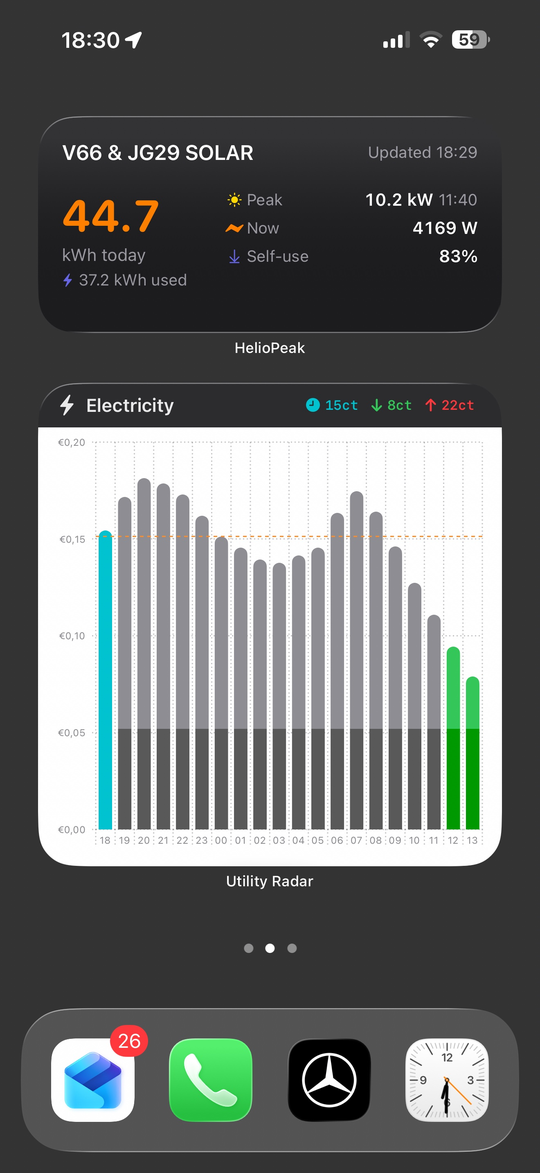
The reason any of this matters is that the smoothness of looking at solar data on a phone is the sum of a thousand quiet engineering decisions, mostly invisible. The visible result is that the data is simply there when you ask for it. That, in the end, is the entire point of the exercise.
Getting in touch
A practical note that belongs near the end of an article like this: HelioPeak is a small project, but it is not a silent one. Feedback drives almost every release, and there are two ways to reach me directly.
For anything personal, like a bug you have found, a feature you would like, or a question about your specific setup that you would rather not discuss in public, the email address is info@heliopeak.app. Every message goes to my inbox and I try to reply within a day or two.
For users who prefer a public conversation, or who want to read what other HelioPeak users are saying before reaching out, there is an ongoing discussion thread on the Dutch tech community Tweakers. I am active there as the developer, and the thread is a good place to ask questions, share screenshots of your installation, request features in front of other users who might second the idea, and watch how the app evolves over time. The thread runs in Dutch, so it is most accessible to Belgian and Dutch users, but international readers occasionally drop in as well.
The PVOutput community forum also has a dedicated HelioPeak topic where I post release notes and answer questions from the international audience. That one runs in English by default and is read by PVOutput users worldwide, which sometimes brings up edge cases that are specific to inverter brands or regional tariff structures we have not encountered before.
Either channel works. The email is faster for personal questions, the forums are better for collective discussions where the answer might be useful to others.
Where this goes next
The series so far has covered everything upstream of the app: how panels work, where they should face, what tariffs reward, how to get data into PVOutput, and how consumption monitoring closes the loop. HelioPeak is one example of what happens at the end of that pipeline. The next article steps slightly sideways, into a different but related topic: home batteries, both the wall-mounted variety and the plug-in alternatives that have appeared in the last two years. They change the self-consumption equation in interesting ways, and they have their own data story. We pick that up in Home batteries in 2026.
For now, if you have data flowing into PVOutput and an iPhone, iPad or Mac in front of you, the rest is a few taps away.